Setting your Language
The Skillsoft Percipio Platform supports multiple languages. If you have been entitled to learning content available in languages other than English, a language selector displays in the top navigation so you can select your preferred language and see content in that language. By default, the platform launches for the first time as defined by your browser language if content is available in that language, otherwise it launches in English (US).
When you select a site language from the top navigation, the Skillsoft Platform interface displays in that language and shows you content in that language. If enabled for your site, the platform can also show English (US) content if no localized content is available. If English is not your first choice, you maybe able to find translated closed captions for many Skillsoft English courses after you launch the course. Translated closed captions also has to be enabled for your site in order for you to see them.
The many languages that the platform supports is listed in this table. In the table you will also see supported languages for translated closed captions, the AI Assistant, and for Skillsoft CAISY™ AI Simulator.
Change Your Skillsoft Platform Site Language
You can change your platform site language at any time except while actively consuming content, for example, playing a course or listening to an audiobook. To change your language:
- Select the language icon,
 at the top of the Skillsoft Platform page.
 - To locate your language in the list, you can scroll or search. To search, enter the first few characters in the search box. You can then pin one or more languages to the top of the list if you want to be able to quickly switch between those languages.
- Select an available language from the list. The platform immediately refreshes and displays the site in the selected language.
When you choose another language:
- The Skillsoft Percipio Platform interface is translated.
- Learning content is limited to the language you chose unless the setting to allow the platform to show English (US) content if no localized content is available is enabled.
- The default system text in emails you receive from Skillsoft Percipio Platform is translated for you based on your language selection. If your admin added custom text to a Skillsoft Platform email or did not configure Percipio compliance emails in your local language, you may see the email in English.
- You must be entitled to content in a language for that language to display in the language drop down.
To change your mobile app language, see Skillsoft Percipio Mobile Language Support.
The Skillsoft Platform login page language
When you access the login page, Skillsoft Percipio Platform automatically detects your browser language.
 If the browser language is supported
- The platform presents the login page in your browser language.
- If language settings are enabled on your site, once you successfully log in, you can change your Skillsoft Percipio Platform site language to any of the supported languages.
- Once you successfully log in, Skillsoft Percipio Platform opens in the browser language, then runs an entitlement check for your content. If you do not have any content in your browser language available to you, a message displays and changes the platform's language setting to English.
If the browser language is not supported
- The platform presents the login page in English.
- If language settings are enabled on your site, once you successfully log in, you can change your Skillsoft Percipio Platform site language to one of the supported languages.
- Once the language is changed, the platform then runs an entitlement check for your content. If you do not have any content available in the selected language available to you, a message displays and changes the platform's language setting back to English.
Web browsers advanced language settings
Most browsers have an advanced Languages setting that controls the displayed browser language. The displayed browser language may be one of several languages available, and it may be anywhere in the list order. In the image of Chrome Language settings below, the selected language is the second language in the list.
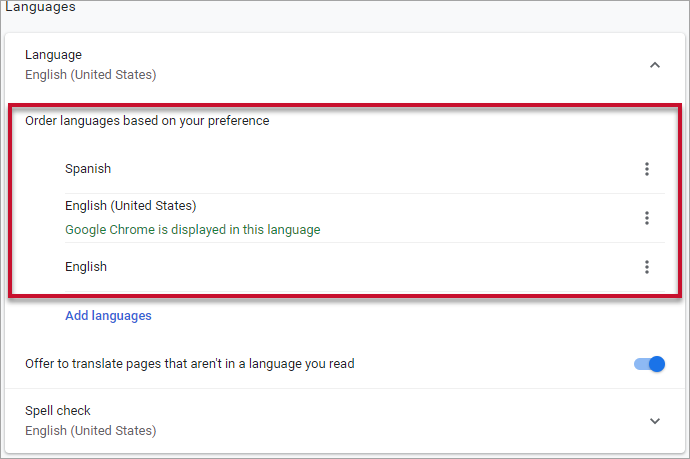
The Skillsoft Platform login page language displays in the language at the top of this language setting list, despite the language selected as the displayed browser language.
Supported Languages
The Skillsoft Percipio Platform supports multiple languages. You must be entitled to content in a language to choose that language from the site language drop down in the top navigation. The table below lists the languages that the Skillsoft Platform supports as well as the languages Skillsoft supports for automated closed captions, CAISY, and AI Assistant.
For more information on how to view automated closed captions in another language, see Courses with Translated Closed Captions.
| Supported Skillsoft Platform Site Languages | Language Code | Available for Translated Closed Captions^ | Available for CAISY** | Available for AI Assistant | Available for LX Design Studio |
| Arabic | ar-LB* | yes | yes | yes | yes* |
| Bahasa (Indonesian) | id-ID | yes | yes | yes | yes |
| Bahasa (Malay) | ms-MY | yes | yes | yes | yes |
| Bulgarian | bg-BG | yes | yes | yes | yes |
| Burmese | my-MM | yes | yes | yes | yes |
| Chinese (simplified) | zh-CN | yes | yes | yes | yes |
| Chinese (traditional) | zh-TW | yes | yes | yes | yes |
| Croatian | hr-HR | yes | yes | yes | yes |
| Czech | cs-CZ | yes | yes | yes | yes |
| Danish | da-DK | yes | yes | yes | yes |
| Dutch | nl-NL | yes | yes | yes | yes |
| Dutch (Belgium) | nl-BE | no | yes | yes | yes |
| English | en-US | yes | yes | yes | yes |
| English (Australia) | en-AU | no | yes | yes | yes |
| English (Canada) | en-CA | no | yes | yes | yes |
| English (India) | en-IN | no | yes | yes | yes |
| English (New Zealand) | en-NZ | no | yes | yes | yes |
| English (United Kingdom) | en-gb | no | yes | yes | yes |
| Estonian | et-EE | yes | yes | yes | yes |
| Filipino | fil | yes | yes | yes | yes |
| Finnish | fi-FI | yes | yes | yes | yes |
| French | fr-FR | yes | yes | yes | yes |
| French (Belgium) | fr-BE | no | yes | yes | yes |
| French (Canada) | fr-CA | yes | yes | yes | yes |
| French (Switzerland) | fr-CH | no | yes | yes | yes |
| German | de-DE | yes | yes | yes | yes |
| German (Switzerland) | de-CH | no | yes | yes | yes |
| Georgian | ka-GE | yes | yes | yes | yes |
| Greek | el-GR | yes | yes | yes | yes |
| Hindi | hi-IN | yes | yes | yes | yes |
| Hungarian | hu-HU | yes | yes | yes | yes |
| Italian | it-IT | yes | yes | yes | yes |
| Italian (Switzerland) | it-CH | no | yes | yes | yes |
| Japanese | ja-JP | yes | yes | yes | yes |
| Kannada | kn-IN | yes | yes | yes | yes |
| Korean | ko-KR | yes | yes | yes | yes |
| Latvian | lv-LV | yes | yes | yes | yes |
| Lebanese Arabic | ar-LB | yes | yes | yes | no |
| Lithuanian | lt-LT | yes | yes | yes | yes |
| Macedonian | mk-MK | yes | yes | yes | yes |
| Norwegian | nb-NO | yes | yes | yes | no |
| Polish | pl-PL | yes | yes | yes | yes |
| Portuguese (Brazilian) | pt-BR | yes | yes | yes | yes |
| Portuguese (Portugal) | pt-PT | yes | yes | yes | yes |
| Romanian | ro-RO | yes | yes | yes | yes |
| Russian | ru-RU | yes | yes | yes | yes |
| Serbian | sr-RS | yes | yes | yes | yes |
| Slovakian | sk-SK | yes | yes | yes | yes |
| Slovenian | sl-SL | yes | yes | yes | yes |
| Spanish (International) | es | yes | no | yes | yes |
| Spanish (Castilian) | es-ES | no | yes | yes | yes |
| Spanish (Latin American) | es-DO | no | yes | yes | yes |
| Swedish | sv-SE | yes | yes | yes | yes |
| Thai | th-TH | yes | yes | yes | yes |
| Turkish | tr-TR | yes | yes | yes | yes |
| Ukrainian | uk-UA | yes | yes | yes | yes |
| Vietnamese | vi-VN | yes | yes | yes | yes |
*The Skillsoft Platform in Arabic is not 100% responsive when users resize browser windows. The Course app in LX Design Studio does not fully support right to left languages yet.
**CAISY is also available in these languages:
- Chinese (Cantonese)
- Chinese (Taiwanese)
^Translated closed captions are also available in these languages:
- Albanian
- Amharic
- Armenian
- Azerbaijani
- Catalan
- Creole
- Gujarati
- Hebrew
- Kazakh
- Marathi
- Slavic Macedonian
- Somali
- Swahili
- Tamil
- Urdu
- Welsh