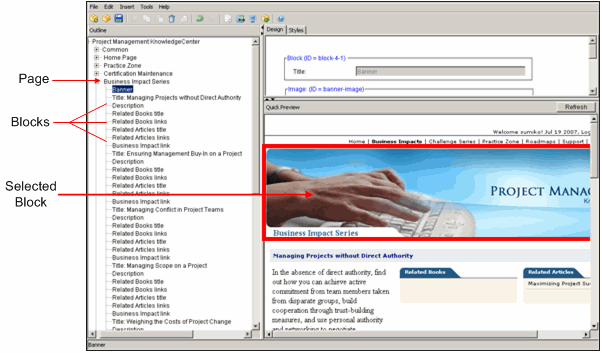
All pages in KnowledgeCenter, Skillsoft Advantage, and Welch Way packages are comprised of a series of blocks. Blocks are comprised of elements that contain the actual content displayed in the portal. Each block has a name that displays in the Outline pane. Click on the plus sign under a page name to display the blocks for that page.
When you select one of the blocks in the Outline pane, the Quick Preview pane highlights the selected block in orange. The block elements display in the Design tab.
Available block templates vary by package type. All package types allow you to copy existing blocks either with or without existing content. Additionally, Skillsoft Advantage and Welch Way packages allow you to add a new block template that you can customize to better meet your training needs.
Some fields in stock blocks cannot be edited. To modify an uneditable field, use the copy block function.
Overlay blocks can be moved to a different location within the same page.
You can hide stock blocks and delete overlay blocks. Hide stock blocks when:
When hidden, stock block content continues to automatically update. You can unhide the stock block at any time for it to appear, fully updated, on your KnowledgeCenter.
© 2015 Skillsoft Ireland Limited