CAISY Analytics
The CAISY integration with Salesforce includes extensive reporting capabilities giving you the ability to analyze how learners are performing. These results are integrated into Salesforce for comprehensive performance reviews. Analyzing your data helps you to know where you need to target your training efforts.
Types of CAISY Dashboards and Reports
CAISY reports and dashboards are grouped into two types, Case and Practice. The Case dashboard and reports reflect data from those scenarios learners launch based on an existing Salesforce case. The Practice dashboard and reports reflect data from those Skillsoft scenarios that learners launch from the Skillsoft CAISY app.
The following are available for each type:
CAISY Case Dashboard and reports:
- CAISY Score Dashboard: This dashboard shows a graphical representation of the report data. You can customize this dashboard to only show the widgets you want.
- CAISY Case Scores by Role: This report shows for each role defined in Salesforce that is associated with a learner who accessed a case, how learners with that role scored on different cases. For each role you see all users with that role, the case they accessed, and their score. Use this report to get an understanding of how different roles are performing.
- CAISY Case Scores by Scenario: This report shows for each case scenario the average score across all learners. Use this report to understand which case scenarios are most troubling to your learners.
- CAISY Case Scores by User: This report shows the average score of for each learner across all case scenarios they took. Use this report to understand who might be your strongest team members.
- CAISY Case Scores by Scenario and Behavior: This report shows for each case scenario and for each behavior selected prior to taking the scenario, the average score of all learners taking that case using that behavior. Use this report to understand which behaviors in which case scenarios are giving your team members the most trouble.
- CAISY Case by User and Scenario: This report shows for each user and each case scenario they took, their average score for each case. Use this report to get a sense of who is practicing what cases and how they are doing.
- CAISY Case Scores by User Over Time: This report shows for each user their average score for case scenarios over time. Use this report to track improvements.
CAISY Practice Dashboard and Reports:
- CAISY Practice Score Dashboard: This dashboard shows a graphical representation of the report data. You can customize this dashboard to only show the widgets you want.
- CAISY Scores by Role: This report shows for each role defined in Salesforce that is associated with a learner who accessed a Skillsoft CAISY scenario, how learners with that role scored on different scenarios. For each role you see all users with that role, the scenario they accessed, and their score. Use this report to get an understanding of how different roles are performing.
- CAISY Scores by Scenario: This report shows for each Skillsoft CAISY scenario the average score across all learners. Use this report to understand which scenarios are most troubling to your learners.
- CAISY Scores by User: This report shows the average score of for each learner across all Skillsoft CAISY scenarios they took. Use this report to understand who might be your strongest team members.
- CAISY Scores by Scenario and Behavior: This report shows for each Skillsoft CAISY scenario and for each behavior selected prior to taking the scenario, the average score of all learners taking that scenario using that behavior. Use this report to understand which behaviors in which scenarios are giving your team members the most trouble.
- CAISY by User and Scenario: This report shows for each user and each Skillsoft CAISY scenario they took, their average score for each scenario. Use this report to get a sense of who is practicing what scenarios and how they are doing.
- CAISY Scores by User Over Time: This report shows for each user their average score over time for Skillsoft CAISY scenarios. Use this report to track improvements
Access CAISY Dashboards and Reports
You must have Salesforce reporting privileges to access CAISY dashboards and reports.
To access dashboards and reports:
- From Salesforce, locate the Reports or Dashboard pages. Generally these are located in tabs across the top.
- From the left navigation, select All Reports or All Dashboards.
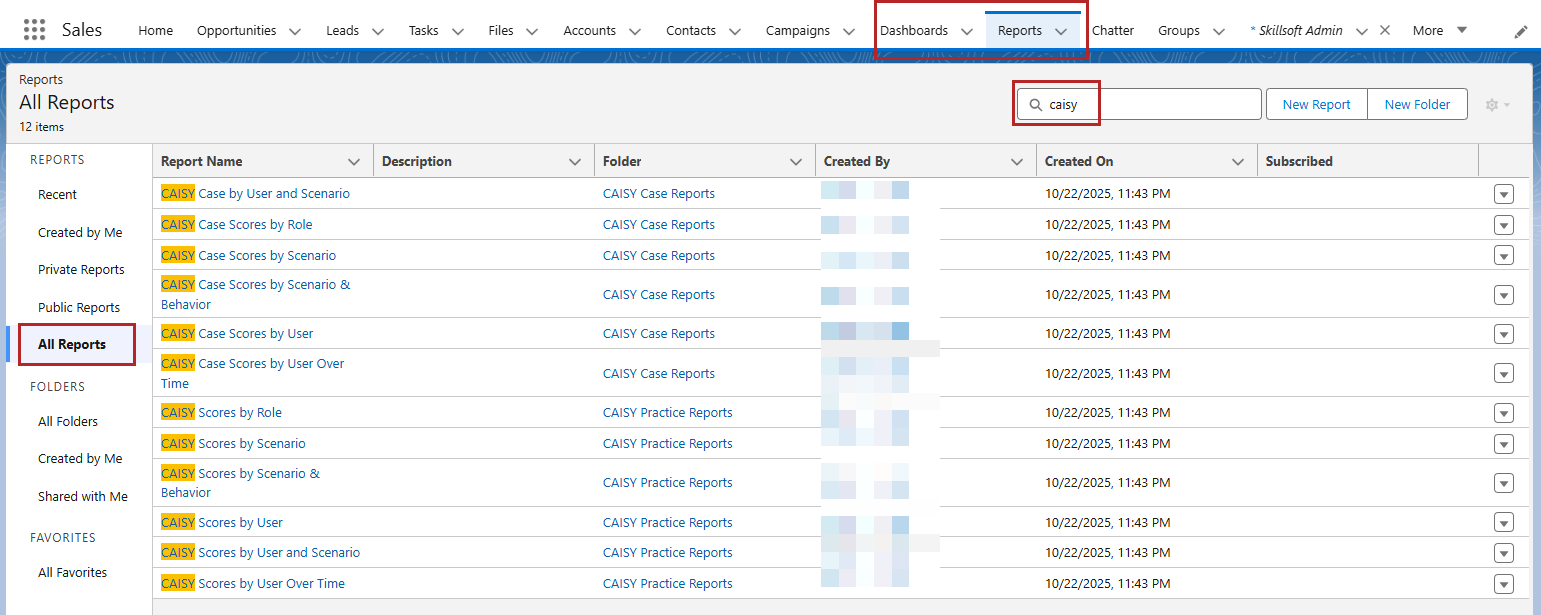
- You can then search or choose the type of CAISY report or dashboard you want to create: CAISY Practice or CAISY Case.
- Select the one you want from the list. You can configure and share the dashboards and reports using standard Salesforce processes.