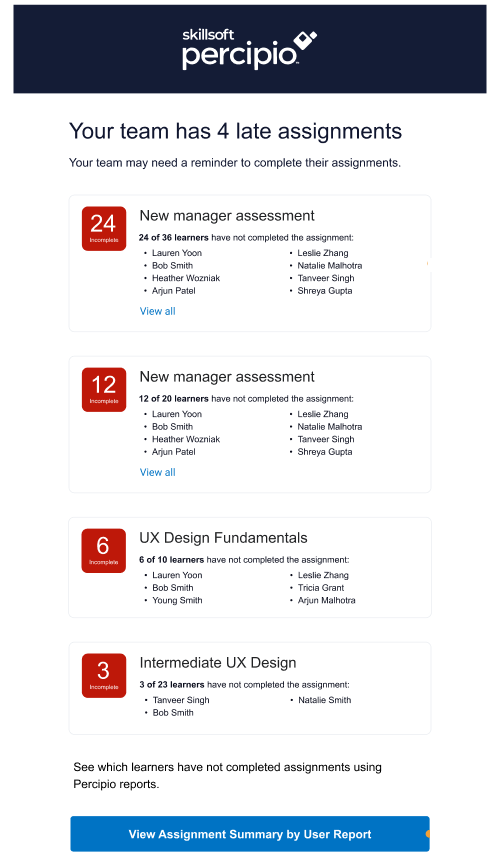
Overdue Assignment Digest for Managers
To help managers encourage their team to complete assignments, you can have managers receive a summary of all the people who directly report to them who have overdue assignments. A person is a direct report if the manager name is added in the Direct Manager user attribute of the person.
If you turn on this email setting, managers cannot opt out of this email. You cannot customize this email. This email goes in addition to any specific assignment setting that copies the manager for coming due and overdue assignments.
Turn the campaign on or off
The overdue assignment digest emails can be either on or off for all managers:
- (Default) On: The platform sends the overdue assignment digest reminder to managers who have learners with overdue assignments. When on, you can choose how often managers receive the email. By default, they get it daily, but you can choose weekly, fortnightly (ever other week) or monthly.
- Off: The platform does not send the email.
A manager is designated by someone who is in the Direct Manager attribute for a user.
If you want to ensure the email uses your brand, see Brand your email.
This email campaign is on by default. You can turn it on or off.
- From the left navigation bar, select Emails & Notifications.
- Select the Settings tab.
- Select Email campaign settings.
- Use the toggle switch to change the state. Make any adjustments to the settings if available.
Sample overdue assignment digest emails
Overdue assignment digest email sample: