XP Tracker
Experience Points (XP) are rewards you earn by completing learning activities on the platform. They reflect your progress, track engagement, and help you move through the levels. XP helps measure your learning momentum and recognizes your effort.
You earn XP by completing a variety of learning activities — such as courses, videos, books, audio books, and skill benchmarks. You system administrator defines the number of points and for which learning activities. Your system administrator also defines the levels and the points needed to move to the next level. As you accumulate XP, you automatically advance to the next level once you meet the threshold.
The value of XP you see in the top navigation, is your total XP of all time.
Access the XP Tracker
You can view your XP at any time.
- Log into your Skillsoft Percipio Platform account.
- There are two ways to access the XP Tracker which shows the details of your XP:
- From the top navigation, expand the XP, and select XP Tracker.

- From the left navigation, select My Learning, then scroll to the XP section and select View XP Tracker.
- From the top navigation, expand the XP, and select XP Tracker.
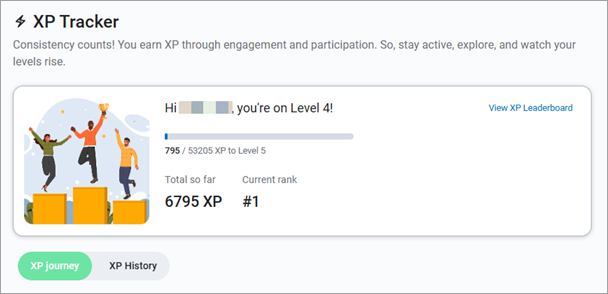
- View your XP status. At the very top of your XP Tracker page you find a summary of your points earned across all time for all your learner activities. You also see your level and your rank (if leaderboards are enabled for your site). Select View XP Leaderboard to see additional ranking details. This opens your Leaderboard page.
- From the XP Tracker page, you can find additional details under each of the two tabs:
XP Journey
When you select the XP Journey tab of the XP Tracker, you see three sections.
My XP Journey
In the My XP Journey section, you see the levels defined by your administrator and the number of points required to earn that level. Your current level is highlighted.
Ways to earn XP and level up
In this section, you see all the ways you can earn XP and the number of XP you earn for each activity . This is defined by your system administrator.
FAQs for XP
In this section, you see some frequently asked questions about how you can earn XP.
 How can I earn XP as a manager?
Managers earn XP by completing a mix of both learning activities and manager activities. Review the section on the XP Tracker page called Ways to earn XP for details on various learner activities.
How does the XP leaderboard work for managers?
There are two leaderboards:
- All Learners Leaderboard: Includes everyone in the organization, including managers. XP here comes from learning activities.
- Managers Leaderboard: Includes only managers and counts XP earned from both learning activities and manager activities.
Can I lose XP?
Generally, XP remains with you once earned. However, if your admin decides to reset or clear the slate, then you'll lose all the XP earned.
Are XP and credits the same thing?
XP tracks your participation and engagement, while certification credits are directly tied to certification requirements.
XP History
When you select the XP History tab of the XP Tracker, you see your progress of earning XP for the last three months by default. Note, this may differ from what you see in the banner or in the top navigation as those track your XP for all time.
You can change the date range to 6 or 12 months.
For each XP earned you see:
- Total XP earned
- The date the XP was earned
- If XP was earned for accessing content, you see the title of the content item and the type of content.
- If XP was earned for performing an action, you see the name of the action, such as Assign content.
If you are a manager, you see an option that allows you to filter on XP earned through only learner activities and XP earned through only manager activities. As a manager, you will always see your total learner XP of all time in the top navigation and in the banner of the XP Tracker History page. If you want to see how you rank against other managers, view your Manager Dashboard.