New Features and Enhancements as of June 2, 2026
New Settings
To help you better manage new features and enhancements that come out with this release, this section contains a summary of new settings that you can configure in Percipio.
 Personalized search now available for learners
If you did not previously turn it off, learners will see a new search filter called Personalized search. When learners turn on the filter, they see more relevant and meaningful search results tailored to their specific job role.
The new filter retrieves up to 60 search results based on the learner’s search query and will re-rank them using an LLM that takes into consideration the learner's job role context. The re-ranked results ensure that higher-quality, role-relevant items display at the top, improving engagement and learning outcomes.
Note that personalization affects the ranking of search results, not their visibility. In addition, when a learner disables the Personalize for My Role filter for the very first time, a feedback form launches once to capture their input.
You can locate the Personalized search setting at: Site settings > Site Configuration > AI Settings > Personalized search
Prepare now: Welcome Email Customizations Moving to Email Templates
Currently, you customize welcome and ad hoc emails directly in their associated email campaign. That customization process is being retired on June 16, 2026 and will be replaced with a new customization process located from Emails and Notifications > Email templates. The new experience allows you greater flexibility to design and manage your Welcome emails for your unique brand and company culture.
Access the new Email Templates process now and start creating your new customized welcome and ad hoc templates. Create as many templates as you want, with fully localized content and adapt them to fit your company culture and brand.
IMPORTANT NOTES: On and after June 16, 2026:
- You can start deploying your new custom Welcome emails.
- The current customization experience becomes read-only.
- Existing custom Welcome emails continue to send as they do today.
- If you want to make additional customizations to Welcome emails, you must recreate them in the Email Template experience.
Analytics Updates
The items in this section showcase changes to reports and dashboards to help you more effectively and efficiently manage your programs.
Coming Soon: Journey detailed export report for multiple journeys, and decommissioning of existing journey reports
Soon, you will be able to export detailed data for multiple Journeys at once into a single CSV file, enabling you to compare performance across Journeys more easily and to run your own analytics outside the platform to better measure learning impact across programs. You can schedule recurring exports and save templates so that your preferred filters and settings are reused automatically, reducing manual setup each time you need updated data.
On the heels of this new report coming out, we will be decommissioning the Journey Detail by User, Journey Summary, and Journey Summary by User reports to make way for new report features that better serve your needs.
Manage, promote, and measure learning
The items in this section provide the tools you need to manage users and content, promote learning, and measure learning effectiveness on your bottom line.
Content Equivalency for Courses in Percipio
You can now create content equivalency groups for your custom courses so that different courses are treated as equivalent across assignments, learner workflows, and dynamic content. This gives learners more flexibility in how they complete required training while you maintain clear control and visibility over completions, Create these groupings from Content > Content relationships.
After you create the equivalency groups, you can create an assignment or dynamic content and learners can choose their preferred course. Completion of any equivalent course counts toward assignment or dynamic content completion.
When creating or editing an assignment, you decide whether to let learners use equivalent content to complete an assigned course by enabling the new Allow completion through equivalent content setting. If you enable the setting, learners see the Switch to equivalent content link next to each applicable assigned course.
In reporting, the Assignment Detail by User report shows which equivalent item each learner completed.
Instructor-Led Training (ILT) Control Center
ILT Administration, now called the ILT Control Center, has been redesigned to be an insight‑driven experience that makes managing live training faster and more intuitive. A new dashboard surfaces actionable insights such as, learners awaiting approval, low‑enrollment classes, missing attendance, and courses that need new classes, so that administrators can act immediately.
Clear, tabbed navigation now separates courses and classes, with enhanced tables, smarter search, persistent filters, and a dedicated drill‑down for all classes for complete visibility. Together, these updates reduce admin effort, preserve context as you work, and give you sharper control over ILT scheduling, enrollment, and outcomes.
For more information, see ILT Dashboard.
Expanding skills of your workforce
The items in this section provide ways to grow your talent and fill critical skill gaps, building mastery with confidence.
AI Assistant enhancements: Responses use Custom Content
With this update, you can rely on the AI Assistant to generate grounded answers directly from your custom content. Now when users ask questions against your custom content sources, they receive answers that are explicitly grounded in those sources with links back to the source passages.
Usability Enhancements
The items in this section show where we are making improvements to the interface for a better experience.
New Library browse experience
The Library page has been redesigned to address key pain points, such as content overload, navigation complexity, and limited personalization. The new design introduces a clean, uncluttered interface with clear visual hierarchy, streamlined navigation, and personalized content discovery.
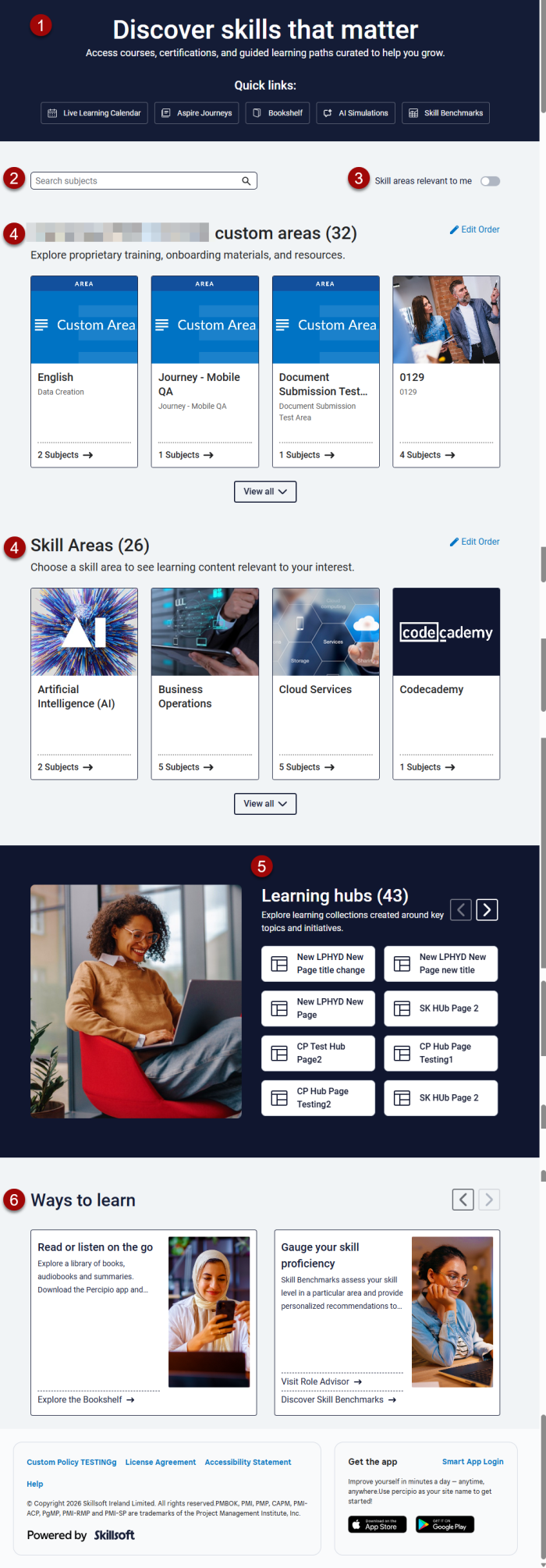
Changes you'll see include:
- An anchoring banner that contains quick links.
- Subject search bar that returns results inline highlighting subject topics and associated areas.
- New toggle to show skill areas relevant to the learner if they specified them in My Learning > Skill Interests.
- Two strips of cards: one for Custom skill areas, one for Skillsoft areas. Each area card provides a description and number of subjects. Areas expand into a list of subjects on the page, and subjects expand into a scrolling carousel of channels and journeys.
- Learning Hubs, a section of buttons that link to content pages built by the Skillsoft content team. Your content license agreement determines what displays in this section.
- Enhanced Ways to Learn section that presents in a carousel and when selected launches to a new page.
Changes you previously made to site branding for Custom Areas no longer apply.
Download Certificate of Completion for Live Courses (ILT)
Learners can now download a certificate of completion directly from the ILT landing page after they successfully complete certificate-eligible live courses.
When multiple certificates are available for a single live course, a popup modal displays so learners can select and download the specific certificate they want.
LX Design Studio Enhancements (Platform only)
The items in this section pertain to LX Design Studio, a suite of AI-driven apps and tools that allows you to easily design custom content tailored to your organization's policies, programs, and skills. LX Design Studio is available to customers who have purchased the Skillsoft Percipio Platform.
LXDS Welcome Email
When you grant a user access to LX Design Studio (LXDS), their individual workspace gets created only after they access LXDS and accept the LXDS policy. At that moment of first access and policy acceptance, the platform sends a personalized welcome email that includes:
- Your organization name
- The organization workspace name
- The learner’s personal workspace name
- A direct link to the learner’s personal LXDS workspace
This ensures learners only receive a welcome message once their workspace is actually ready, reducing confusion and support requests while giving them a clear path back into LXDS.
Only Admins can create new workspaces
With this update, you gain tighter control over workspace creation so your environment stays organized and easier to manage over time. Non-admin users no longer see the Create new workspace option in the Workspace menu. Only LXDS Admins can create new workspaces.
Coming Soon reminders, in case you missed it
The items in this section highlight changes to AI elements in the platform so you can stay in compliance with your internal processes and guidelines.
Coming soon: Set data retention period for Skillsoft Conversation AI Simulator (CAISY™)
When you allow Skillsoft to collect the learner side of the conversation during a CAISY interaction, you now have the ability to set how long Skillsoft retains that data. When AI optimization and improvements setting is on, by default, Skillsoft retains the data for 180 days. You now have the option to reduce it to 30, 60, or 90 days.
Please note that if you do shorten the retention period, you may limit our ability to improve AI feedback and accuracy and learners only see their conversation history for that retention period.
Coming soon: AI-enabled certification data capture and validation for file uploads
When learners upload certification files AI will automatically capture certification details and confirm that the uploaded file represents a professional certification, avoiding reliance on manual entry and improving accuracy and consistency at the point of submission.
Learners can review and adjust the extracted information before submitting. This enhancement gives managers and HR greater confidence in the validity of uploaded certifications while ensuring more complete and representative certification reporting.
♦On pause for now. We spotted something that didn’t meet our standards, and we’re working on it.