New Features and Enhancements as of November 3, 2026
Foundational enhancements for all
The items in this section apply to all customers who have the Skillsoft Percipio Platform.
 Prepare now: New Library browse experience coming December 1, 2026
We are planning to introduce an updated Library experience with the goal of making it easier for learners to find relevant content, navigate more intuitively, and focus on the skills most relevant to them. The new design introduces a clean, uncluttered interface with clear visual hierarchy, streamlined navigation, and personalized content discovery.
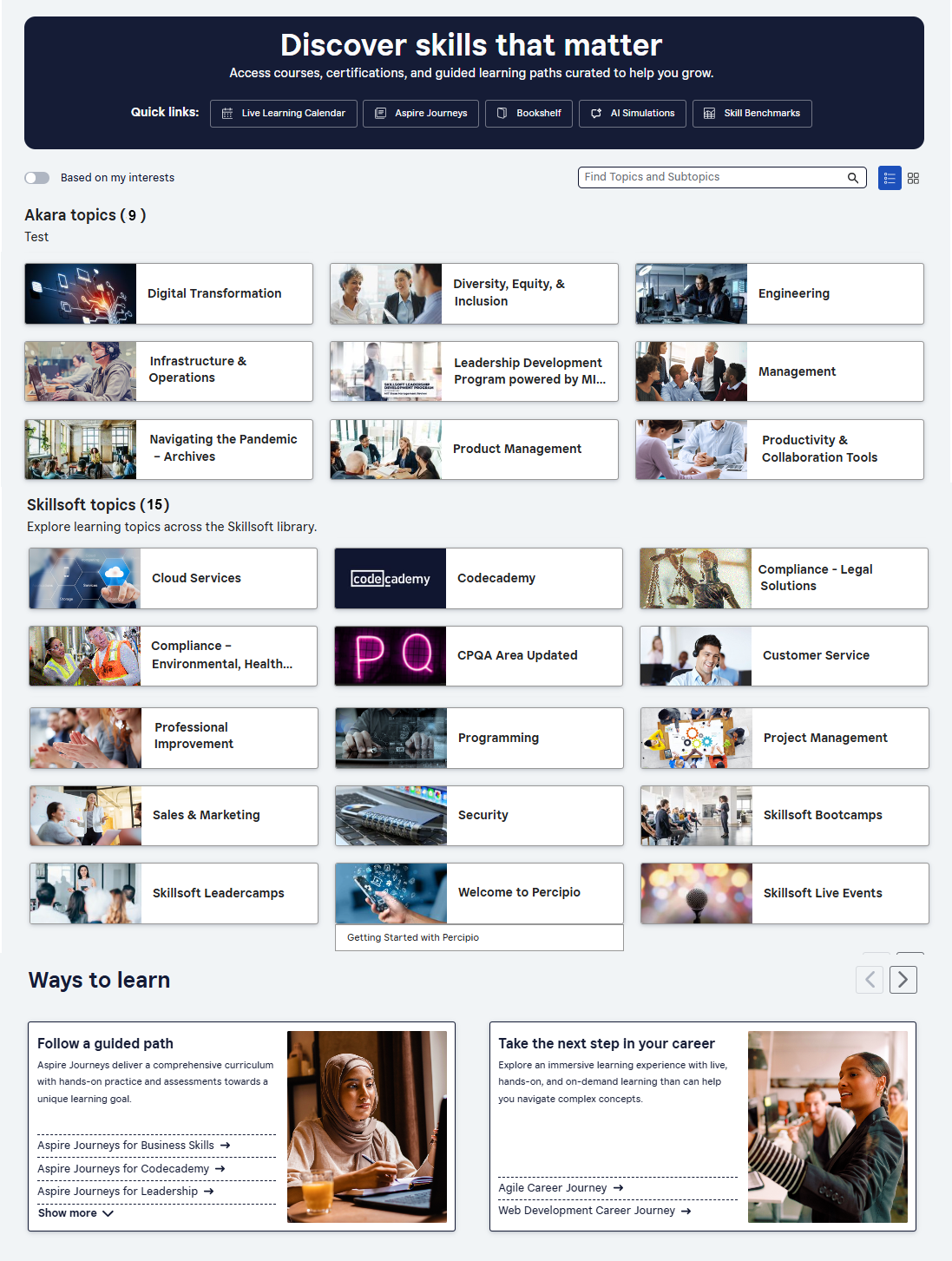
Changes you'll see include:
- Renaming of Areas to Topics and Subjects to Subtopics.
- An anchoring banner that contains quick links. Previously, there was no banner, just a line of quick links. You can brand the banner with your colors and text.
- Subtopic search bar that returns results inline highlighting which topics and subtopics contain the content. Previously, there was no search for finding content within topics, only the main search.
- New toggle to show topics relevant to the learner if they specified them in My Learning > Skill Interests. Previously, you could only view all content areas or topics.
- New setting that allows learners to toggle the view to show images on the topic cards instead of just text. If you did not add images when you created your custom areas, learners see the default image for areas. You can set the default view (with or without images) and prevent users from toggling it.
- Certification paths moved to the Certification Center page.
- Enhanced Ways to Learn section that presents in a carousel instead of all at once, and when selected, launches to a new page.
To help you prepare your organization for these changes, we have created:
- A video highlighting changes in action
- A comparison table indicating where to find things
- A message to download that you can share with your learners
- Admin to-do check list:
- Decide how to brand the banner colors, the title, and subtitle you want to learners to see. (The admin setting will come before the learners' view is activated.)
- Decide which view will be your default view and if learners should be able to toggle between the views: standard view with images or compact view without images. (The admin setting will come before the learners' view is activated.)
- If you are using the standard view, ensure all your areas (topics) have images associated with them, otherwise the default image shows.
- Ensure the order of areas (topics) is how you want it. It should not change.
- Let learners know they can find certifications from the Certification Center.
- Encourage learners to define Skill Interests to help narrow the content focus when the use the new filter.
New setting: CAISY voice mode with Gemini Live
You can now turn Gemini Live on so learners can interact with CAISY in a more life-like dialog fashion. With this new setting, you control how learners interact with CAISY in voice mode: either through Gemini Live or the existing Azure speech-to-text (STT) and text-to-speech (TTS) experience. The Gemini Live setting is off by default.
New Completion & Certificates report with bulk certificate download
The new Completion & Certificates report helps you quickly find completion records and download official certificates for compliance and audit needs eliminating the need for manual follow-up with learners and giving you faster access to proof of completion.
Access the new report from Analytics > Reports > Completion & Certificates. You can filter results by date range, learner, audience, asset type, title, and language. From the list, you can download an individual completion certificate or bulk download up to 2,000 certificate-eligible completions at a time. The bulk request processes in the background and displays under Report downloads, where you can retrieve the ZIP file when it is ready. You can also schedule the report to run daily, weekly, or monthly for recurring reporting.
Additional enhancements for those with the full platform
The items in this section pertain to the fully licensed version of the Skillsoft Percipio Platform which includes LX Design Studio, AI Coach, and Page Builder. Customers with this level of access get these features and enhancements in addition to the ones above.
General platform features
AI-assisted journey creation: Site setting now defaulted to on
With this release, AI-assisted journey creation is now turned on by default for eligible sites. You can find this setting in Site Settings > Site configuration > AI Settings > AI-assisted journey. When this setting is on, users who can create journeys see the option to create a journey with AI assistance. This update makes it easier to adopt AI-assisted journey creation without requiring you to turn the setting on manually.
AI assisted journey creation uses generative AI GPT models to help you build custom learning journeys. Instead of manually selecting and sequencing content, you provide answers to a set of prompts that guide you through the journey description, learner goals, target roles, milestones, preferred formats, duration, etc. At the end, the AI generates a tailored journey outline and recommends both Skillsoft and custom content. You review and approve the journey before publishing it to your production environment.
Coming December 15, 2026: AI-enabled certification data capture and validation for file uploads
When learners upload certification files, AI will automatically capture certification details and confirm that the uploaded file represents a professional certification, avoiding reliance on manual entry and improving accuracy and consistency at the point of submission. This new AI feature will be on by default, but you will be able to turn it off.
Learners can review and adjust the extracted information before submitting. This enhancement gives organizations greater confidence in the validity of uploaded certifications while ensuring more complete and representative certification reporting.
Course Designer
Course Template Manager: More control when editing templates in the design stage
This release adds new editing and layout controls to the Course Template Manager. Authors can now make more design changes directly in the editor, and generated videos match their slide designs more closely.
- Delete any element: You can now delete every type of element in the design stage, including icons, images, text boxes and unwanted placeholders. Previously, some element types couldn't be removed.
- Format selected words: You can apply formatting to specific words or phrases within a text element. Previously, formatting applied to the whole text element.
- Layering controls: Bring elements forward or send them backward to control how overlapping elements stack on a slide.
- Alignment guides and snapping: New alignment guides, snap-to positioning and positioning controls help you place elements precisely and keep layouts consistent.
- Better video conversion: Generated videos now keep your slide formatting and colors more accurately.
Coming Soon reminders, in case you missed it
The items in this section highlight changes to AI elements in the platform so you can stay in compliance with your internal processes and guidelines.
Coming later this year: Channel page user enhancements
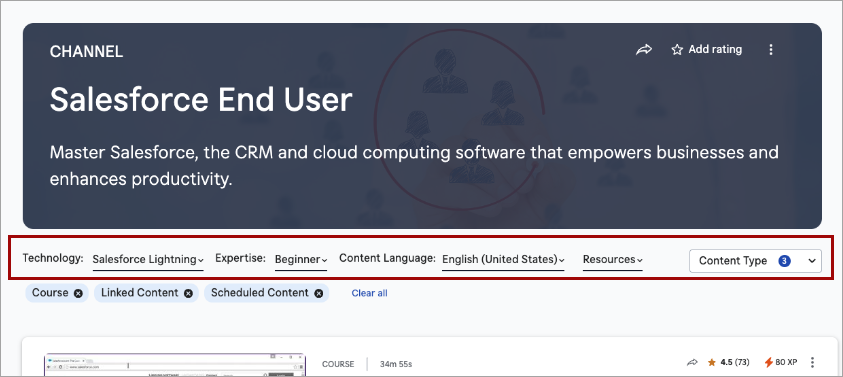
To help learners more easily locate content within a channel, they will soon see enhancements to the Channel pages of the Library, including:
- The channel filters, such as expertise level, duration, and source, which previously displayed in the banner, now display in the page content area, where they sit between the banner and the content list. The simplified banner now only shows the channel title, description, and hero image/background.
- The modality tabs no longer display. All content shows in one list.
- A new Content type filter that mimics the Content type filter on Search display alongside the channel filters. All content types contained within the channel are shown by default, but learners can filter on just the content types they want to see.
- Learners can use Load More to progressively browse content without a full page refresh. The first set of results loads initially, and additional items are appended as they are requested.
Coming soon: Run reports using natural language with AI Assistant
You will soon be able to use the AI Assistant to run, download, and schedule analytics reports using natural language. The AI Assistant may help identify the appropriate report, apply supported filters, and return results without requiring manual report configuration.
With this enhancement to the AI Assistant, you can:
- Run analytics reports using natural language prompts.
- Download report results as CSV files.
- Schedule report delivery by email on a one-time, daily, weekly, or monthly basis.
Natural language filtering currently supports date ranges, audiences, users, and content titles. Report scheduling is available for Standard Reports and Skillsoft Template Reports; custom templates are not currently supported. AI Assistant does not currently return dashboards.
So we can continually improve, please submit feedback using the thumbs up/down icon in the response.