Explore the Library
The platform library contains all of the learning assets available to you. These assets are organized into a hierarchy to help you find content quickly and easily. You can explore the library, search for content, and add your favorite content items to your playlist.
Note: You can explore the library in the selected platform language only. To see more content offerings you may be entitled to, change your language setting, then explore again.
Content organization
The Library page is organized to help you easily find the content you need. The content in the library is organized hierarchical as follows:
- Topics: broad groupings of content that display on the Library page in either the Custom topics or Skillsoft topics sections. The order that topics display are arranged by your administrator, but the default is alphabetical.
- Subtopics: Another level of topic-grouping of content that display under a topic. Select an area to see its subjects.
- Channels: Channels are the core building blocks of the library. A channel further refines the subject into sub-topics of related content presented in an organized way. You cannot complete a channel.
- Journey:Journeys are another of the core building blocks of the library. A journey offers a defined learning path of related content presented in an organized way. You can complete a journey.
- Content: Content includes courses, videos, modules, books, book summaries, audiobooks, audio summaries, live courses, Skill Benchmarks, Practice Labs, TestPreps, dynamic content, CAISYs, and any custom content your admin adds, including items from LX Design Studio (if your company licensed it).
Explore the library
To explore the library, from the left navigation bar, select Library.
This new experience is coming December 1, 2026:
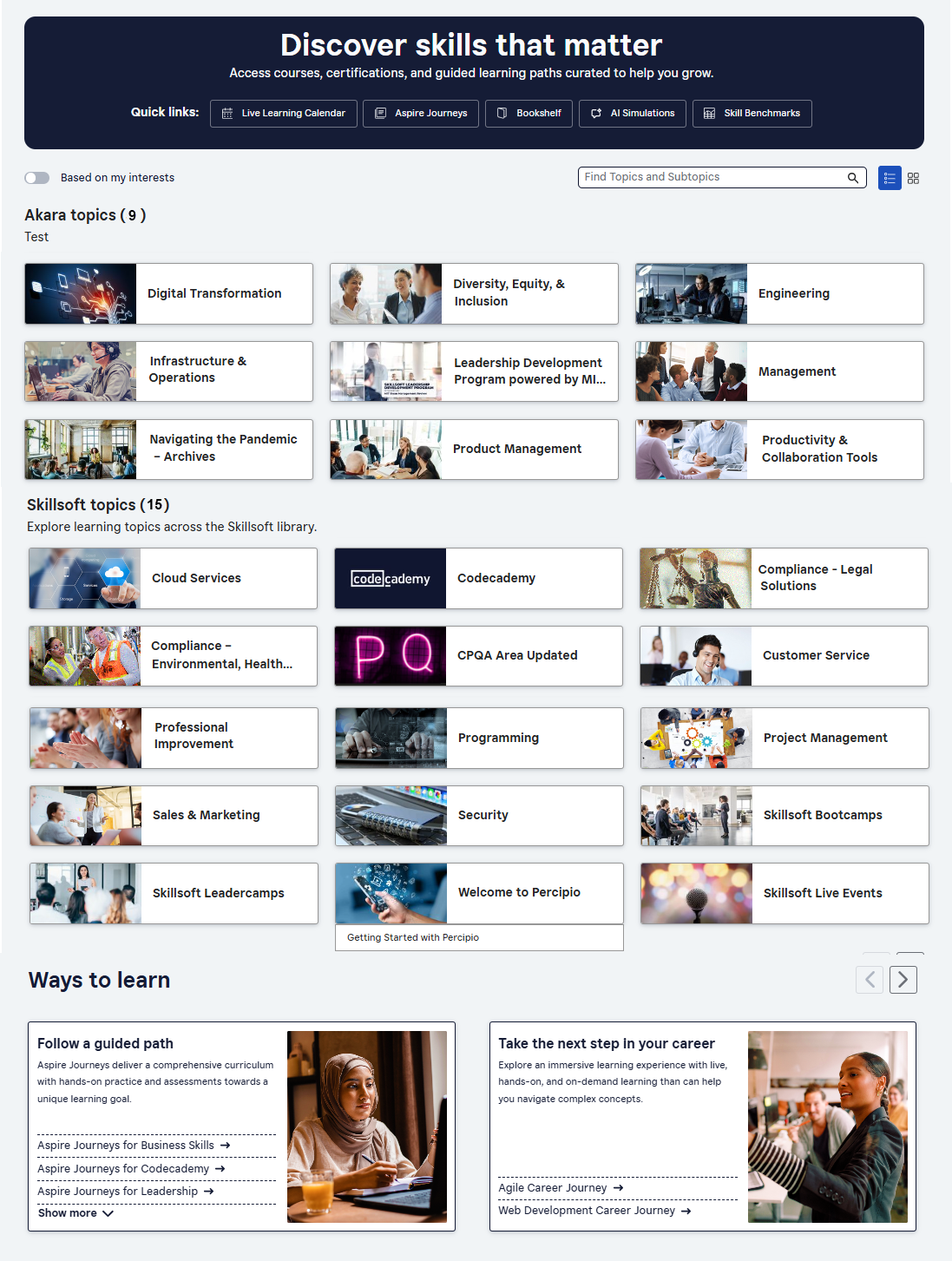
From the Library page, you can:
- Use a quick link from the banner to jump to a specific type of content.
- Search to return results inline that highlight topics and subtopics.
- Toggle between all topics (company defined and Skillsoft ones) and just the topics based on the skill interests you specified in My Learning > Skill Interests.
- Browse topic cards segmented by Skillsoft content and your company's content. When you hover over a topic card, the card expands and you see the topic title and associated subtopics. Select either the topic or a subtopic to open a page.
- Custom skill topics: If your admin created a custom menu category, you see custom topics specific to your organization that showcase the most important content for your organization. If your administrator hasn't created any custom topics, you won't see this strip.
- Skillsoft topics: Topics that contain content that your company licensed from Skillsoft. It may also contain some custom topics depending on how your admin has configured your library. If you are entitled to three or fewer total topics (custom and Skillsoft), you only see the associated subtopics so that you can get to relevant content with fewer clicks through the hierarchy.
- Choose a specific Way to Learn. This section presents specific content such as an Aspire Journey, the Bookshelf, CAISY AI simulations, Live learning calendar, and Skill Benchmarks in a carousel. Scroll the carousel to find the content you want and select it to open a page with details.
- Follow a guided path: This block contains: Aspire journeys: Journeys are structured learning paths which provide content to achieve the skills for a specific job role or function. This block displays all Aspire journeys by topic for easy access.
- Engage in live learning: This block contains the Live Learning Calendar, as well as Skillsoft Bootcamps and Leadercamps that display if you are entitled to the content.
- Practice makes perfect: This block takes you directly to all AI conversation simulations and labs that allow you to practice in a real-world like environment without the pressure of being in the real world.
- Read or listen on the go: This block shows the Bookshelf where you can browse and search for books, audiobooks, and summaries that are entitled to you. You can also find podcasts.
- Gauge your skill proficiency: If enabled on your site, this block targets skills for your role and gaining skill proficiency. Access Skill Benchmarks or your Role advisor page.