Assignment Emails
When you use email notifications with assignments, you help learners know that they need to complete an assignment and by when. You control all assignment emails and their schedule from within the assignment.
By default, the Skillsoft Platform provides a set of default templates you can use for notifying and reminding learners of assignments. You can also create a fully customized set of assignment emails for assignments created and launched after August 11, 2026. For assignments launched prior to August 11, 2026, you have limited customization capabilities.
For more information about assignment emails, see:
- Set default reminder schedule
- Manage schedule for reminders for an individual assignment
- Send an off cycle reminder
- Customize Skillsoft assignment email reminders for assignments launched prior to August 11, 2026
- Customize Skillsoft assignment email reminders for assignments created after August 11, 2026
Types of assignment emails
There are four types of assignment emails:
-
Initial notifications: You can choose to have this email go out to learners when they are added to an assignment letting them know they have to complete it. You configure when to initially send this notification when you create the assignment. The day and time you specify is in your time zone, not the learners. There may be a delay from when the system sends the email and when the learners receive it depending on network traffic and when the email lands in the email queue. These emails get sent every 30 minutes at the top and bottom of the hour. For assignments launched prior to August 11, 2026, you can customize parts of this email which uses the Assignment coming due template. For assignments launched after August 11, 2026, you can fully customize this email.
-
Reminder notifications: You can choose to send a series of reminder notifications both prior to and after the due date letting learners know that they need to complete an assignment. For assignments launched prior to August 11, 2026, reminders sent prior to the due date use the Assignment coming due template and any customizations you made to it; and reminders sent after the due date use the Assignment past due template. For assignments launched after August 11, 2026, you can fully customize this email.
-
Ad hoc notifications: If you want to send an off-cycle email notification or did not schedule reminder notifications, you can select to send an ad hoc email reminder. For assignments launched prior to August 11, 2026, reminders sent prior to the due date use the Assignment coming due template with any customizations your made to it; and reminders sent after the due date use the Assignment past due template. For assignments launched after August 11, 2026, you can fully customize this email.
-
Cancellation notifications: When you cancel one or many learners from an assignment, you can choose whether they get a notification that the assignment was canceled. If a user gets removed from an audience that is associated with an assignment, the user automatically receives the cancellation notification. You cannot customize this email.
Default platform assignment emails contain the details of and links to assigned content. There are two default assignment email templates that get used to generate initial notifications, reminder notifications, and ad hoc email notifications. One template is for when an assignment is coming due and another templates is for when an assignment is past due. For assignments launched prior to August 11, 2026, you can only customize the Assignment coming due template and any customization applies to all assignment emails that use that template. For assignments launched after August 11, 2026, you can customize three different templates.
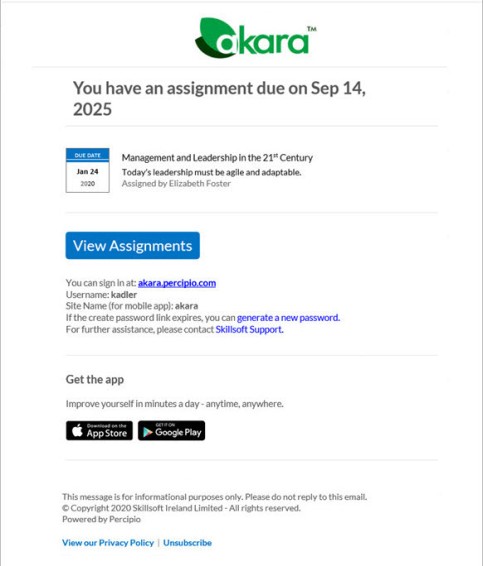
 Default assignment coming due template
Custom text can be added to this template.
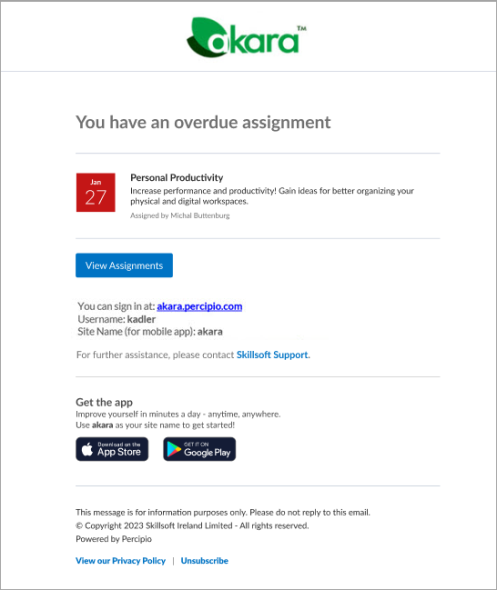
Default assignment past due template
This template cannot be customized.
Additional information about assignment emails
When you create a new assignment, you use the Notify Users page to specify the date and time to send an initial email notification to learners.
-
For assignments launched prior to August 11, 2026
- You can add a custom message to the Assignment coming due template. If you add customized text for the email notification when you create the assignment, those customizations are also used in both the one-off email reminders and the reminder emails that go prior to the due date as part of the reminder schedule.
- When you edit an assignment, you can change any customizations made to the Assignment coming due template. These changes apply to any email reminders the platform sends prior to the due date, whether that is a one-off email or part of the schedule reminder series.
- When you brand your emails to change your logo or colors, those changes are also reflected in the assignment emails.
-
For assignments launched after August 11, 2026, you can customize three different templates. You can create many templates and choose the one you want to send for each reminder and each assignment. You can also use the default platform templates that only apply branding customizations.
Email triggers
All assignment emails except initial notifications get sent once per day. If they are not triggered prior to the send time of: 1:00 p.m. UTC in the US and 8:00 p.m.UTC in the EU, they go the next day.
If a learner has content items completed prior to getting the assignment, and the assignment is not configured to restart, the learner will not get notifications if the completed items complete the assignment.
- Initial assignment notification: You turn on this initial notification when creating an assignment and set a date on which to send this initial notification. The day and time you specify is in your time zone, not the learners. There may be a delay from when the system sends the email and when the learners receive it depending on network traffic and when the email lands in the email queue. These emails get sent every 30 minutes at the top and bottom of the hour.If learners get added after the initial launch, they automatically get sent this email within 30 minutes of being added to the assignment. Depending on network traffic, the learner may not receive it within 30 minutes. If the assignment is automatically marked complete at the time it is issued, the platform does not send any assignment notification or reminder emails.
- One-off assignment reminder emails: You can send a one-off reminder email immediately when you select Email from the More actions menu on the Assignments page.
- For assignments launched prior to August 11, 2026, if you send these email reminders prior to the due date for the learner, the learner sees the Assignment coming due template including any customizations made for the initial notification. If you send these email reminders after the due date for the learner, the learner sees the Assignment past due template, which you can't customize.
- For assignments launched after August 11, 2026, you can customize a template and select the one you want to use.
- Schedule email reminders: You can configure email reminders at the organizational or individual assignment level. The platform sends the reminder emails automatically to learners until they complete the assignment. The platform sends these reminder emails based on the assignment duration and the frequency set for each reminder segment: Initial, Due date approaching, and Past due.
- For assignments launched prior to August 11, 2026, both Initial and Due date approaching email reminders use the Assignment coming due template including any customizations made for the initial notification. Past due reminders use the Assignment past due template, which cannot be customized. Learners receive all reminder notifications until they complete the assignment.
- For assignments launched after August 11, 2026, you can customize a template and select the one you want to use.
- Cancellation notifications: These get sent automatically when a learner is removed from an audience that is associated with an assignment. If you cancel a learner from an assignment, you can choose whether to send a cancellation notification.
The learner stops receiving reminder emails when they complete the assignment; if the assignment is automatically marked complete at the time it is issued, no assignment notification emails are sent.