New Features and Enhancements as of June 16, 2026
AI Updates
The items in this section highlight changes to AI elements in the platform so you can stay in compliance with your internal processes.
 REVISED: Targeted for June 19, 2026: New Aspire Journey that uses Anthropic models
We will soon be releasing a new Aspire Journey, AI-Assisted Development with Claude, where your learners will use the Claude Haiku model with Claude Code as their development partner to create full-stack applications, alongside other AI offerings such as the AI assistant and Codex CLI.
You automatically receive this new journey with your Technology and Developer Skills Suite. AI content must be enabled on your site and the collection must be entitled in order for learners to see it.
Targeted for July 11: AI model updates for AI Assistant
We are targeting to update our AI conversation models for AI Assistant on July 11, 2026. Learners are not likely to notice any changes when interacting with any of these features.
This update is part of our commitment to staying current with the latest advancements in AI technology, ensuring that we continue to provide you with the best possible security and user experience. If you require additional information, please reach out to your Skillsoft account team.
Coming Soon: AI model updates for CAISY™ AI Simulator
We are planning to update our AI conversation models for CAISY AI Simulator some time in the near future, not less than 30 days from now. Learners are not likely to notice any changes when interacting with any of these features.
This update is part of our commitment to staying current with the latest advancements in AI technology, ensuring that we continue to provide you with the best possible security and user experience. If you require additional information, please reach out to your Skillsoft account team.
Coming Soon
This section provides advanced notice of features that are shipping soon. These features could impact the way your company uses the site so we want to provide advanced notice.
Prepare Now: New design for completion certificates and new customization experience
In this release, you see a new design for the completion certificate. You also see a new menu option under Site Settings called Certificate customization where you can more fully customize your completion certificate. With this change, you have more options to design, preview, and manage completion certificates so they better reflect your organization’s brand and compliance needs. With this change, you can:
- Create a different completion certificate for different content types.
- Choose what information displays on the certificate, such as up to three different signatures, duration, content type, and certificate number.
- Add colors and logos
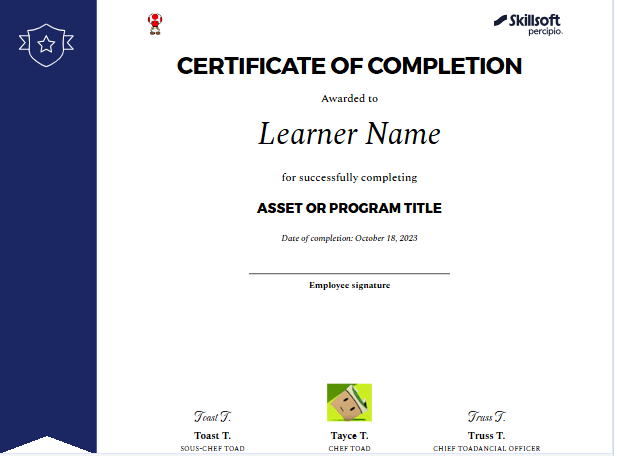
Recommended action: Review and adjust the new custom certificate style before learners start receiving it on June 30, 2026. Navigate to Site Settings > Certificate customization to get started.
As of June 16:
- Learners continue to receive your existing custom completion certificates until June 30, 2026.
- The ability to customize completion certificates is now located under Site Settings > Certificate Customization. The customization of completion certificates under Site Branding is now inactive.
- Your existing branding is automatically brought into the new design where possible:
- Logo – Upper right becomes Logo – Right.
- Logo – Lower right becomes Logo – Left.
- Primary color becomes Foreground color.
- Background color defaults to white.
- Text color defaults to black.
- Secondary color does not carry over because the new design does not support a secondary color.
- Default content on the new certificate includes:
- Content type (on banner)
- Certificate number
- Learner name (required)
- Asset or program title (required)
- Date of completion (required)
- Duration
Please note: Learners will begin receiving the new certificate design for any completions starting June 30, 2026. If they previously downloaded a completion certificate, that certificate remains cached for 30 days, so they could continue to see the old design through July 29, 2026 unless they redownload it.
Coming Soon: New Library browse experience
We recently introduced an updated Library experience in the Skillsoft platform with the goal of making it easier for learners to find relevant content, navigate more intuitively, and focus on the skills most relevant to them. While that intent was rooted in improving the learner experience, we recognize that we moved too quickly and did not give you enough advance notice to prepare your teams and support learners through the change.
We’re sorry for the disruption and frustration this caused.
Based on your feedback, we reverted to the original Library experience while we address the issues raised and take a more thoughtful approach to the future rollout.
Before we reintroduce the new experience, we will provide:
- Preview materials and documentation
- Guidance for communicating changes to learners
- More lead time so your team can prepare effectively
When we reintroduce the new design in the platform, it will become the standard experience. Our goal is to ensure your team has the advance notice, guidance, and support needed to prepare and adopt it successfully. More details to come.
Analytics Updates
The items in this section showcase changes to reports and dashboards to help you more effectively and efficiently manage your programs.
Learning Program Dashboard filter change
To help you more accurately track long-running learning programs, you can now filter the Learning Program Dashboard by a custom date range, focusing on periods of active learner engagement rather than only the original program launch date.
Scheduled Assignment Summary by User and Assignment Detailed by User reports support all history data for the manager role
When a user with the role of manager accesses either the Assignment Summary by User or the Assignment Detailed by User report, and they set up a schedule for this report, they see a new All History option in the Date Range filter drop down menu.
When a manager selects All History for the scheduled report date range, the scheduled report includes all available records from the earliest data through the run date, with no time-based filtering. The All History option is available for managers only for all schedule frequencies: Monthly, Weekly, Daily, and Once.
Manage, promote, and measure learning
The items in this section provide the tools you need to manage users and content, promote learning, and measure learning effectiveness on your bottom line.
New option to use latest completion date for calculating next occurrence in recurring assignments
In this release there is a new setting for recurring assignments called: Apply latest completion toward assignment. This setting defines which date the platform uses to evaluate whether the learner met the initial occurrence criteria. It also uses this date to calculate the next occurrence due date if the initial occurrence is met.
When the setting is checked, the platform uses the completion date closest to today’s date. If the setting is unchecked, the platform uses the first completion date logged in the platform for the user.
For all new assignments, the setting is checked by default, which means that the platform will use the recorded completion date closest to todays' date to evaluate whether the learner met the initial occurrence criteria and to calculate the next occurrence due date.
For all existing assignments, the setting is unchecked. This has been the default behavior for all recurring assignments.
This setting:
- Works for both single-asset and multi-asset assignments, including equivalent completions where applicable.
- Works consistently with learner activity, imported completions, and admin overrides/waivers.
- Works with both initial occurrence settings: Allow all learners to restart and complete all content from the beginning and Allow learners who started content on or after a specific date.
For more details, please see Create Assignments.
New Welcome email customizations now available for campaign selection
The new Welcome email customization experience is now fully available from Emails and Notifications > Email templates. The new experience allows you greater flexibility to design and manage your Welcome emails for your unique brand and company culture including the ability to fully translate your welcome messages.
If you do not use custom Welcome emails today, but you do send the default Skillsoft Welcome emails, you will not notice any change and the Welcome emails will continue to send in the order you specified.
If you use custom Welcome emails:
- The custom welcome emails you added prior to June 16, continue to send in the order you specified.
- If you designed any new custom Welcome emails using the new Email Templates, you can now add them to your Welcome email campaign. To do add them:
- Select Emails and Notifications > Settings > Email Campaign Settings > Welcome emails
- From the drop down list next to the email, select your new custom email template from the list. Optionally, select the eye icon to preview the email to ensure it is the correct one.
- Your changes are saved automatically.
- If you want to revise any of your custom Welcome emails from before Jun 16, 2026, you must recreate them in Email Templates and then add them as part of the Welcome email campaign settings.
You can create as many Welcome email templates as you want and change them out whenever you want. Learners will always get the one specified in the current campaign setting.
Dynamic Content - Bulk hide mapped content from search and browse
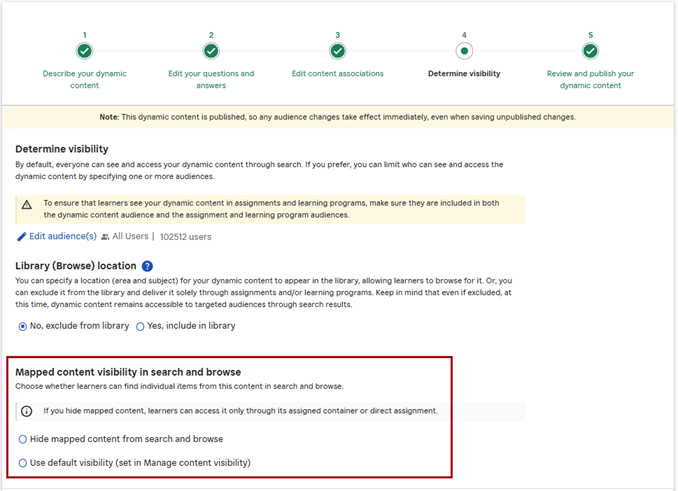
From the Dynamic Content build workflow, you can now control whether content items, used in Dynamic Content, are discoverable in learner search and browse. This helps ensure learners only launch content from the assigned Dynamic Content so they receive proper credit and complete required assessments, reducing situations where they miss assessment questions and tracking is incomplete.
With this update:
- A new Content Visibility option is available on the Determine Visibility step of the Dynamic Content workflow.
- If you have the permission to Manage Hidden Content, you can choose to bulk hide all eligible content items included in the dynamic content. Content items get hidden when you publish the dynamic content.
- Hidden content no longer displays in learner search results or in the Recommended carousel, but remains accessible within the Dynamic Content asset itself or when directly assigned.
Usability Enhancements
The items in this section show where we are making improvements to the interface for a better experience.
Ability to download certificate of completion from course player for Skillsoft courses
Learners can now download their completion certificates directly from the Skillsoft course player after they successfully complete a certificate-eligible course. This makes it easier for them to immediately capture and share proof of completion without needing to leave the learning experience or navigate to another page.
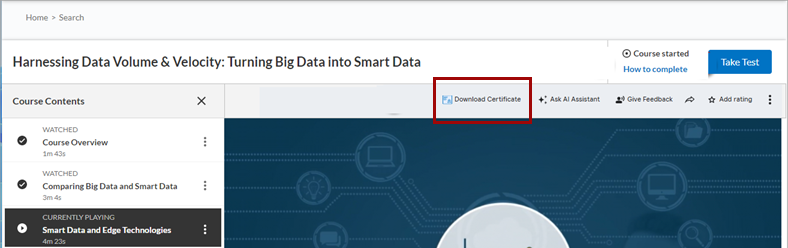
If a Skillsoft course offers multiple certificate options, learners see a popup modal that lists all available certificates, allowing them to choose and download the specific certificate they need.
Learners will not see the option to download a completion certificate for Skillsoft Compliance courses from the course player at this time.
XP Enhancements for managers - Change in displayed XP
To help reduce confusion for managers when viewing their XP, managers now see only XP earned from learner activities of all time on the top navigation bar and in the banner of the XP Tracker. With this change, managers may see a reduction in the total number of XP displayed in these two places.
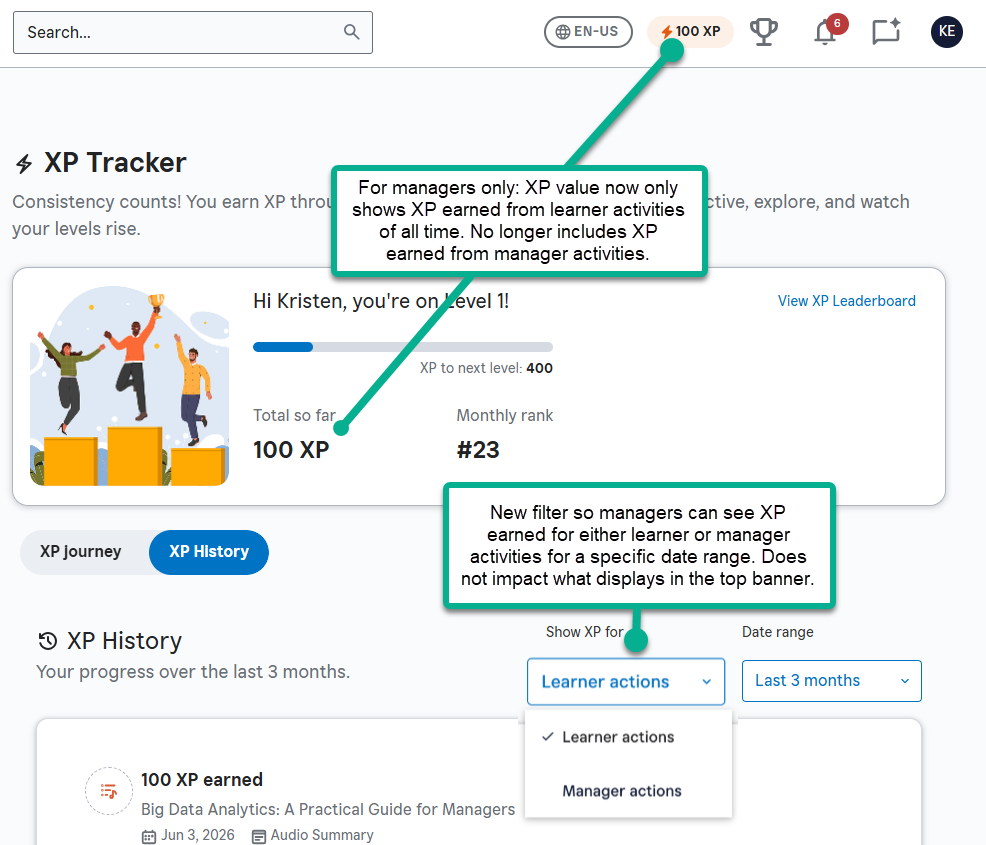
From the XP Tracker History page, managers can now filter between XP earned through learner activities and XP earned through manager activities for a specific date range.
Managers can still view their rank among other managers for XP earned through manager activities from the Manager Dashboard and Leaderboard.
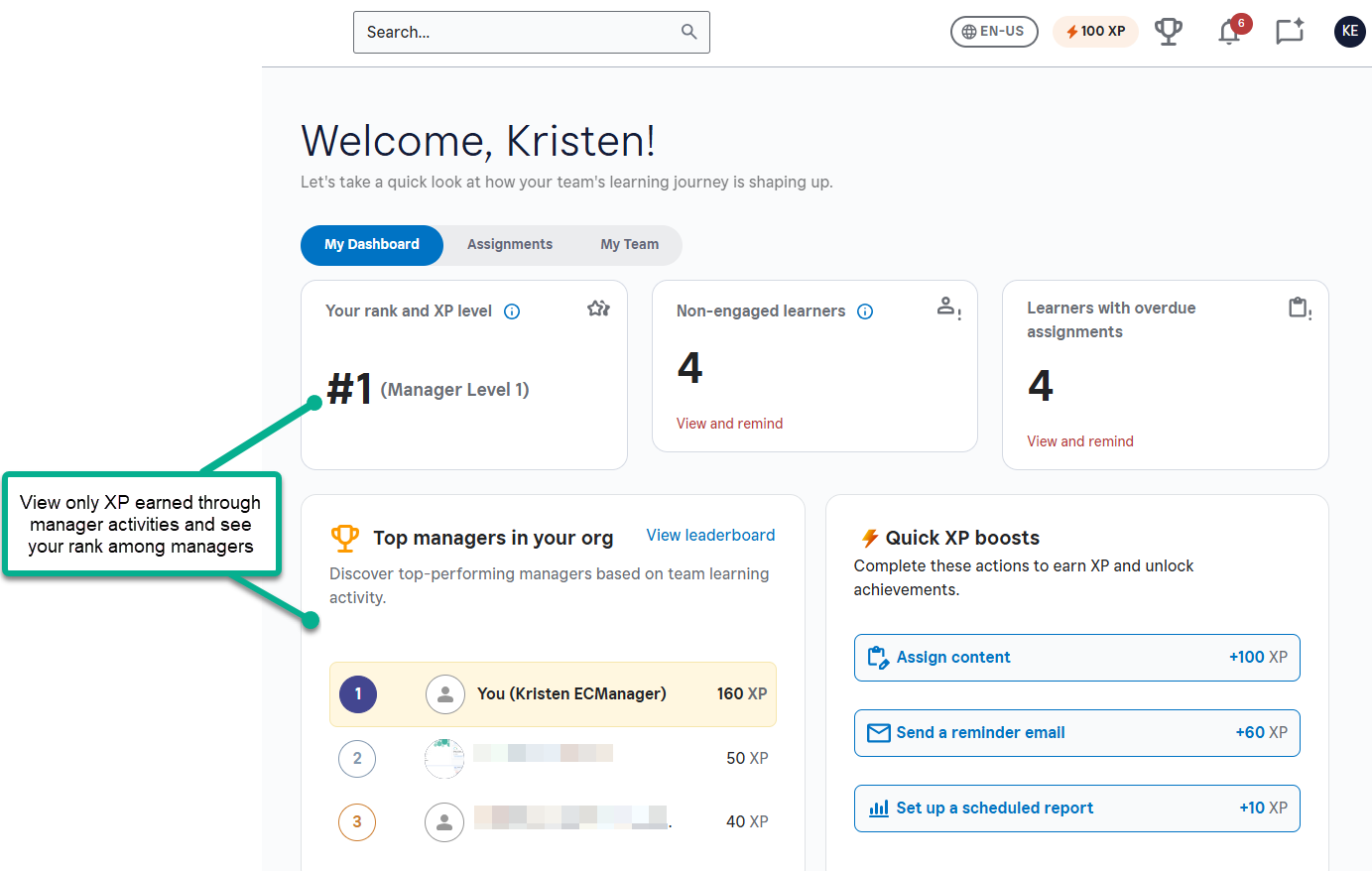
This change ensures that managers see a consistent, pure learning engagement view of their progress across the site, while still being able to review their managerial contributions separately via the XP History filters.
Skillsoft Coaching enhancements
For customers of Skillsoft Coaching, this section reports on changes made to Skillsoft Coaching and the platform to support the interaction.
For details on these enhancements, please see the Coaching Knowledge Base.
Skillsoft Coaching video settings
Admins can now manage Skillsoft coaching video settings at the company level from Enterprise Dashboard > Company Settings. This centralizes control and eliminates the need to configure settings per learner.
You can enable Skillsoft video for 1:1 and Group Coaching, and optionally turn on AI summary and chat for Group sessions. Changes apply to newly scheduled sessions.
Issues from the Skillsoft Coaching Accessibility Conformance Report (ACR) remediated
All known accessibility issues identified in the most recent Skillsoft Coaching Accessibility Conformance Report (ACR) have been remediated. This means the Skillsoft Coaching experiences now better aligns with accessibility standards, helping you support a more inclusive experience for all learners using Skillsoft Coaching.
LX Design Studio Enhancements (Platform only)
The items in this section pertain to LX Design Studio, a suite of AI-driven apps and tools that allows you to easily design custom content tailored to your organization's policies, programs, and skills. LX Design Studio is available to customers who have purchased the Skillsoft Percipio Platform.
Add videos as topics in custom courses
To help streamline your creation of custom courses, you can now add mp4 video files as their own topics. As part of the Outline process before you generate scripts, you can add a video as its own topic. After you select the option to Add topic, select Add video and you can:
- Choose a video you previous uploaded to the Media Library
- Upload a new video to the Media Library and choose that
- Search for a known Skillsoft video
For more information, see Create a course.
Add and remove users from LX Design Studio from the Admin Dashboard
You can now give users access to LX Design Studio directly from the LX Design Studio Admin Dashboard without switching to the Skillsoft platform. This makes it faster and easier to manage who can build and publish content. With this update:
- You can grant access to LX Design Studio to users who already have a Skillsoft platform user account. You cannot create a new user on the platform from LX Design Studio.
- You can choose which role they should have in LX Design Studio: Creator or Publisher. You cannot change their Skillsoft platform user role permissions from LX Design Studio, you must do that in User Management. If you want a user to have admin privileges in LX Design Studio, you must first make them a site admin in the Skillsoft platform.
- You can remove a user’s access to LX Design Studio while preserving their existing content, workspaces, and projects.
- User records stay in sync with the Skillsoft platform User Management so that account information remains consistent.
For more details, please see Add user and Remove user.
Create custom skill benchmark from a Skillsoft Skill Benchmark
You can now use existing Skillsoft Skill Benchmarks to create custom Skill Benchmarks, enabling faster creation of tailored assessments. This allows you to start from a proven benchmark and modify it to suit your organization’s specific needs.
Allow only named recommendations for custom skill benchmarks
You can now disable platform-generated recommendations for custom skill benchmarks when you want to ensure that learners only get the designated recommendations configured as part of your custom skill benchmark. This gives you greater control over how learners are guided post-assessment.
This setting is available under the Site settings > Site configurations > Content settings > Disable dynamic recommendations for custom Skill Benchmarks.
Custom Skill Benchmarks now show in the Manage Content List page
Previously, if you created and published a custom skill benchmark in LX Design Studio, it did not display in the Manage Content List page with other custom content. It now displays on the list with all your other custom content so that you can sort, filter, and manage all items in one place.
Add an external design brief to Design Assistant
If you have been collaboratively working with your team on design specifications for new content, you can now add your specifications to the Design Brief template and import them directly into the Design Assistant without having to have the initial dialogue.
When you upload your design specifications using the template, the Design Assistant has all the details up front so it can provide you with a more tailored learning solution and content recommendations.
Get started by downloading the template from the Design Assistant, populating it with your agreed upon specifications, and uploading it to start creating your content.
Add audio files to the Media Library and use their transcripts as knowledge sources in supported apps
With this release, authors of LX Design Studio can now add audio files to the Media Library. LX Design Studio then creates a separate transcript from the audio file that authors can use as a knowledge source when creating content.
Authors can add audio files from the following places:
- From the Media Library: Select Audio, then Upload.
- From the Project page and the Project media tab: Select a project, then switch to the Project media tab and select Add > Upload and choose an mp3 format. This ensures the audio file is available at the project level.
- From the Content item view details page: Select Media Selector > Audio. Locate an existing audio file in the list or Upload audio file to add one.
Coming Soon reminders, in case you missed it
The items in this section highlight changes to AI elements in the platform so you can stay in compliance with your internal processes and guidelines.
Coming Soon: Journey Detailed Export report for multiple journeys, and decommissioning of existing journey reports
Soon, you will be able to export detailed data for multiple Journeys at once into a single CSV file, enabling you to compare performance across Journeys more easily and to run your own analytics outside the platform to better measure learning impact across programs. You can schedule recurring exports and save templates so that your preferred filters and settings are reused automatically, reducing manual setup each time you need updated data.
On the heels of this new report coming out, we will be decommissioning the Journey Detail by User, Journey Summary, and Journey Summary by User reports to make way for new report features that better serve your needs.
Coming soon: Set data retention period for Skillsoft Conversation AI Simulator (CAISY™)
When you allow Skillsoft to collect the learner side of the conversation during a CAISY interaction, you now have the ability to set how long Skillsoft retains that data. When AI optimization and improvements setting is on, by default, Skillsoft retains the data for 180 days. You now have the option to reduce it to 30, 60, or 90 days.
Please note that if you do shorten the retention period, you may limit our ability to improve AI feedback and accuracy and learners only see their conversation history for that retention period.
Coming soon: AI-enabled certification data capture and validation for file uploads
When learners upload certification files AI will automatically capture certification details and confirm that the uploaded file represents a professional certification, avoiding reliance on manual entry and improving accuracy and consistency at the point of submission.
Learners can review and adjust the extracted information before submitting. This enhancement gives managers and HR greater confidence in the validity of uploaded certifications while ensuring more complete and representative certification reporting.