New Features and Enhancements as of April 7, 2026
Manage, promote, and measure learning
The items in this section provide the tools you need to manage users and content, promote learning, and measure learning effectiveness on your bottom line.
 Rename custom attribute values
If you have a need to rename a value in a custom list attribute, you can now rename the value and have it populate throughout the system. User profiles automatically get updated with the new name and any audiences that you created using the value are also updated with the new name.
For more information, see Rename List attribute values.
Create audiences using relative date attributes
You can now create audiences that include learners who are within a specific number of days after or before a specific date attribute. When you specify the number of days before or after a date value as input, you dynamically segment your learners based on employment milestones such as hire date, years of service, or retirement date.
Use these audiences when you want to make assignments, so that learners automatically receive the assignment at the appropriate time, such as when a group learners who start on the same day need to receive an assignment 30 days after they start, or for a group of learners who need to complete an assignment 14 days prior to their leaving.
For more details, please see Create audience.
Updated Learner Messaging for Skillsoft CAISY AI Simulator
When learners, who work for the US Federal Government or other companies with DEI restrictions, launch a CAISY simulation, they may see new messaging if they try to engage CAISY in a conversation that is outside the guardrails specified by the current U.S. regulatory requirements related to diversity, equity, inclusion, or accessibility (DEIA) topics.
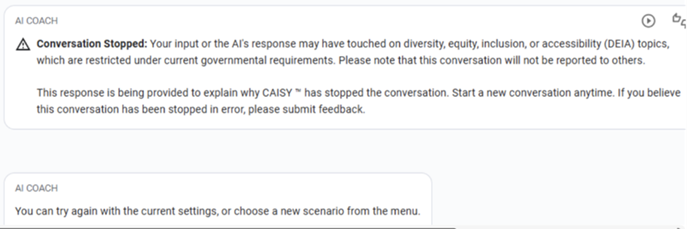
The new message does not display for customers outside the U.S., non-federal customers within the U.S., or those who have not requested DEI restrictions on their experiences. If you notice this message appearing outside these boundaries, please reach out to Skillsoft Support.
Prepare now for new features
This section provides advanced notice of features that are shipping soon. These features could impact the way your company uses the site so we want to provide advanced notice.
Prepare now with a new admin setting for personalized search, coming for learners later in April
Coming later in April, learners will see a new search filter called Personalized search unless you disable it for your site. When learners turn on the filter, they will see more relevant and meaningful search results tailored to their specific job role. The new filter will retrieve up to 60 search results based on the learner’s search query and will re-rank them using an LLM that takes into consideration the learner's job role context. The re-ranked results ensure that higher-quality, role-relevant items display at the top, improving engagement and learning outcomes. Note that personalization affects the ranking of search results, not their visibility.
With this release, you will see a new admin setting, Enable personalized search, that will be on by default. Before the feature goes live for learners, you can choose to disable the Personalized search filter for your organization. We recommend that you keep it on to help ensure learners see the most relevant content for their needs.
You can locate the new setting at: Site settings > Site Configuration > AI Settings > Personalized search
Prepare now for a new email campaign that will go to managers when their team has overdue assignments
A new email campaign will send daily reminders to managers when one or more learners from their team has an overdue assignment.
This email campaign is on by default. You can disable the campaign now before the emails start going to managers on April 21, 2026. Locate the setting at: Emails and Notifications > Settings > Email campaign settings > Overdue assignment digest for managers.
We recommend that you keep it on as another way to ensure overdue learners complete assignments. This email is in addition to the CC manager setting within an assignment (if turned on for an assignment).
Prepare now for Instructor-Led Training (ILT) changes coming soon: Mark concluded classes complete and share enhancements
The following two enhancements are coming later in April. To prepare for these enhancements, we encourage you to mark all learners complete for classes that have concluded. You may also want to share this information with all your ILT administrators.
Please note: The following changes will only apply to classes that start after April 21, 2026.
-
Instructor‑Led Training (ILT) will support multiple completions with automatic restarts
- Learners will be able to complete the same ILT course multiple times. When a learner registers for a new class within the same ILT course, the platform will automatically restart the course at the class start date, creating a new activity record while preserving the prior record for reporting. Each restart is treated as an independent completion record.
- Per existing state, learners can only register for a new class after the previous class end date has passed.
- When a restart occurs, the previous activity record is frozen and can no longer be updated by instructors or administrators. Attendance must be taken before a learner starts a new class, as frozen records do not allow additional attendance actions.
-
Instructor‑Led Training (ILT) will support attendance corrections Administrators will soon be able to revise previously marked attendance to correct errors. Admins will be able to update attendance one time per record:
- If a learner was marked complete, the completion can be revoked.
- If a learner was marked incomplete, the record can be updated to complete.
General announcement
This section contains general notifications about how Skillsoft supports our customers.
Updated Accessibility Conformance Report for Skillsoft Coaching
An updated Skillsoft Coaching WCAG 2.2 Accessibility Conformance Report is now available, dated March 25, 2026. This update is based on the findings from an internal audit of the entire platform and its content. This ensures that the platform continues to meet high accessibility standards, providing an inclusive experience for all users.
For more details on accessibility settings and conformance reports, see Accessibility.
LX Design Studio Enhancements (Platform only)
The items in this section pertain to LX Design Studio, a suite of AI-driven apps and tools that allows you to easily design custom content tailored to your organization's policies, programs, and skills. LX Design Studio is available to customers who have purchased the Skillsoft Percipio Platform.
Admin Dashboard with workspace management
As an administrator in LX Design Studio, you now have access to an Admin dashboard from your profile drop down. Users with create or publish only access cannot see the dashboard.
The dashboard shows you total users, workspaces, projects, and content items that your team is working on. From the dashboard, you can see a user list and manage workspaces. This means you can view a list of all workspaces, manage members, rename, and delete workspaces all from one location. You can continue to use these same options under the Show options menu in the left nav for the selected workspace.
Media Library Interface Enhancements
To enhance your media management experience, the Media Library now offers a new layout that makes it easier for you to manage your different media formats more efficiently. The new layout features tiles that represent the media types for images and videos.
When you select the images tile, in addition to uploading image files from your system, you can now include images from Unsplash, an approved third party image library that is royalty-free.
In the future, you will be able to add other media types like audio and AI image generation.
Coming Soon reminders, in case you missed it
The items in this section highlight changes to AI elements in the platform so you can stay in compliance with your internal processes and guidelines.
Coming soon: Set data retention period for Skillsoft Conversation AI Simulator (CAISY™)
When you allow Skillsoft to collect the learner side of the conversation during a CAISY interaction, you now have the ability to set how long Skillsoft retains that data. When AI optimization and improvements setting is on, by default, Skillsoft retains the data for 180 days. You now have the option to reduce it to 30, 60, or 90 days.
Please note that if you do shorten the retention period, you may limit our ability to improve AI feedback and accuracy and learners only see their conversation history for that retention period.
Coming soon: AI-enabled certification data capture and validation for file uploads
When learners upload certification files AI will automatically capture certification details and confirm that the uploaded file represents a professional certification, avoiding reliance on manual entry and improving accuracy and consistency at the point of submission.
Learners can review and adjust the extracted information before submitting. This enhancement gives managers and HR greater confidence in the validity of uploaded certifications while ensuring more complete and representative certification reporting.
Coming in June: Instructor-Led Training (ILT) Control Center (Custom ILT Administration Update)
ILT Administration, now called the ILT Control Center, is getting a redesigned, insight‑driven experience that makes managing live training faster and more intuitive. A new dashboard surfaces actionable insights—like learners awaiting approval, low‑enrollment classes, missing attendance, and courses that need new classes—so administrators can act immediately. Clear, tabbed navigation now separates courses and classes, with enhanced tables, smarter search, persistent filters, and a dedicated drill‑down for all classes for complete visibility. Together, these updates reduce admin effort, preserve context as you work, and give you sharper control over ILT scheduling, enrollment, and outcomes.