Emails and Notifications
Skillsoft Platform-generated emails and push notifications can help you increase license consumption and adoption of your full content offerings. As a site administrator, you can manage Skillsoft Platform-generated emails and push notifications. You can customize email settings, emails campaigns, and templates to match your organization's culture and business requirements.
In addition to the emails and push notifications, the platform offers an in-app message center that reminds learners and admins of upcoming deadlines and unfinished activities. Users can see these notifications under the bell icon from the top navigation bar.
For a full list of all learner and admin emails and push notifications, see List of Emails and Notifications.
About Email Notifications
- Skillsoft Platform-generated emails are supported for both SAML and non-SAML users, based on your site configuration.
- If you want emails to look like they come from your company, set the Alternate email address and Organization name.
- Skillsoft Platform-generated emails are accessible.
- Recipients can open the emails on any device.
- Supported languages include all platform site languages. You can set the default email language on the Email Settings page. The default language only applies until the learner logs in and sets their site language, then the learner gets the email in that language.
- Learners can opt out of some emails at any time.
- The platform runs a nightly program to generate recommendation and re-engagement emails at approximately 12:00 a.m. and 3:00 a.m. UTC/GMT Monday through Friday. Your learners receive these emails only once per week on a specific day as designated for your Skillsoft Platform.
- Learners receive Digital Badge emails on Mondays and Thursdays only if they have new badge activity.
- You can choose to send a single Welcome email instead of the Welcome and reminder email series.
- User data is encrypted.
- No PII data is ever shared with third parties unless you designate it.
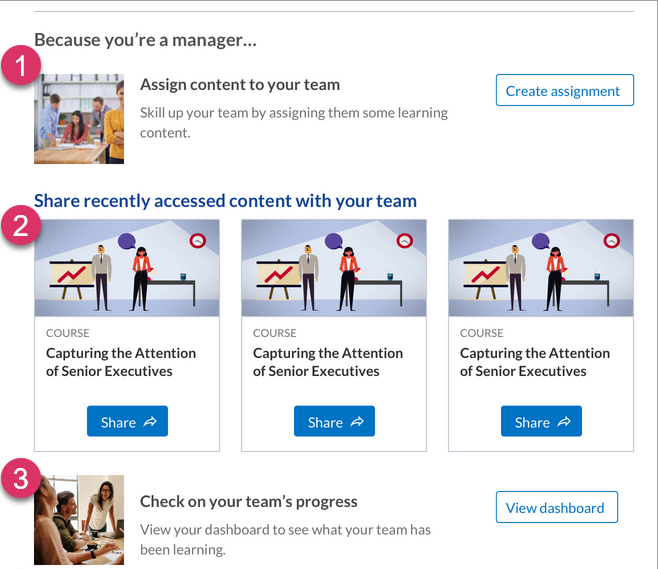
- Users with a Skillsoft Platform role of manager, see an additional section at the bottom of the Recommendation,
Re-engagement, Digital Badge, or Audience owner emails as a way to encourage managers to promote learning with their teams. For every email, the platform randomly chooses one of the following options to put in this section:
- Assign content to team (this option only displays if managers have the custom privilege to assign content.)
- Share recently accessed content with team
- Check on team’s progress
About Push Notifications
Push notifications show for users who are using the Skillsoft Percipio mobile app. To receive push notifications, users must have push notifications turned on for the Skillsoft Percipio mobile app and also have the individual notifications turned on. Admins cannot customize any push notifications.
Get started
To access the email and notification settings:
-
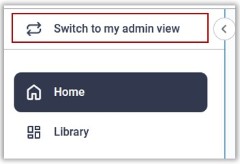
Ensure your left navigation is in the admin menu view. To get there, select Switch to my Admin View. If you see Switch to my Learner View, that means you are on the admin view.
- From the left navigation bar, select Email & Notifications.
- Select one of the tabs from the top to configure:
- Email Campaigns: Configure which emails to send to users to keep them coming back to the platform to learn.
- Settings: Configure your organization name, default email template language, what emails get sent, and whether the Skillsoft Platform can collect a user's email address if one is not specified. To further brand your emails, see Brand your Emails.