New Features and Enhancements (as of February 2022)
Expanding skills of your workforce
The items in this section provide ways to grow your talent and fill critical skill gaps, building mastery with confidence.
 When learners add the term practice labs to search, labs now display at the top of the result list
If learners enter the words practice lab as part of their search query, for example, Azure practice labs, search now shows matching lab assets at the top of the result list. If the learner just searches for the generic term “practice lab”, search returns a list of all the entitled lab assets.
Learners now get alerted when content is retiring soon
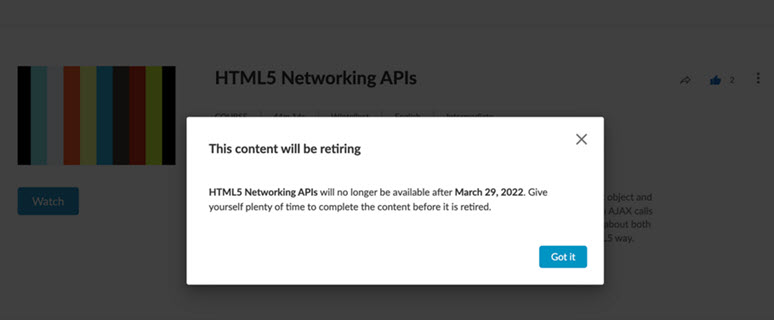
When a learner launches content where a retirement date is available, they see an alert display that the content will be retiring. This alert is active for courses, videos, channels, and linked content.
Engaging your learners to build a learning culture
The items in this section provide ways to engage your users so they want to learn and make learning a habit.
Learners can now schedule learning time
If your site has turned on Learning Goals, learners now have the option to schedule time on their calendars to help them complete their learning goal.
For more details on how to schedule time, see Learning Goals.
Enhancements to Recommendation strip on home page
The Recommendation strip on the home page now excludes content that the learner already launched or completed.
Manage, promote and measure learning
The items in this section provide the tools you need to manage users and content, promote learning, and measure learning effectiveness on your bottom line.
NEW Executive Dashboard released as beta version
We are still working on additional updates and refining the metrics, but wanted to introduce the Executive Dashboard. During the beta release we are looking to collect your feedback so we can make adjustments before it's in general release. You can access it now from the Analytics menu.
When viewing the dashboard, select the Provide Feedback button in the upper right corner to send your feedback directly to the Product team.
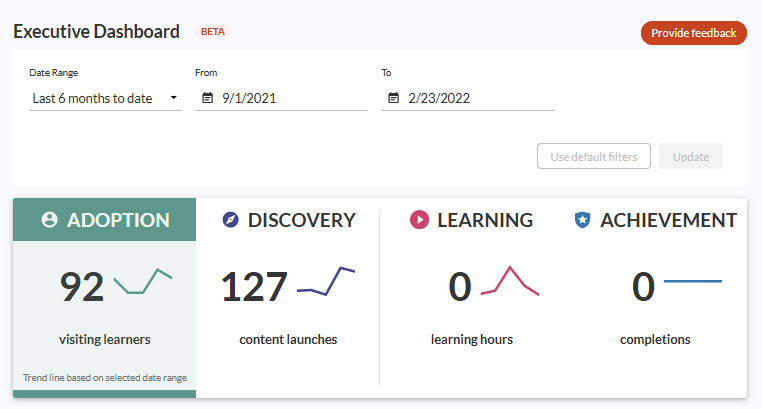
The dashboard is a framework for showing value and providing insights about learning success. It is designed to show how your people are moving from adoption through to achievement. The four distinct areas of measurement on the dashboard are:
- Adoption: Measures the percent of active users who visited the site over the specified time period. It shows how many are new versus returning users and what device they are using.
- Discovery: Measures the average number of content launches per learner who visited the site.
- Learning: Measures how much time learners spend in the content they launch.
- Achievement: Measures completions as the total number of completions divided by the total number of starts, not accesses.
For more details, see the Executive dashboard or launch it from the Analytics menu.
The All Content Listing reports now contain additional metadata
When viewing the All Content Listing by Title or the All Content Listing by Collection reports, you now see additional metadata. The new columns included are:
- WCAG: Indicates if the content conforms to Web Content Accessibility Guidelines (WCAG)
- Content Owner: Identifies who created the content
- Copyright Year: Identifies the year the content was copyrighted
- Keywords: Contains a comma-separated list of keywords associated with the asset
- Transcript: Indicates if a transcript is available
- Captions: Indicates if captions are available
For more details see either the All Content Listing by Title or the All Content Listing by Collection reports.
Updated the default sort order on the User Management page
The sort order for users on the User Management page is now last name, followed by first name. This is the expected behavior.
The Manage Content Items page now contains ability to filter on Source
When viewing the Manage Content Items page, you can now filter on the Source column. This will help you distinguish between your custom content items.
Changed the value of User ID to use External ID in the Compliance Assignment Summary by user report
The User ID field in the Compliance Assignment Summary by User report now populates with the External ID and not the UUID. This is more helpful in distinguishing the unique user.
Compliance, Ecosystems, and Integrations
The items in this section help you to integrate the Skillsoft Platform across your learning ecosystem and promote how Skillsoft works with its partners.
Compliance administrators now receive advance notice when courses are to be updated
When a compliance administrator accesses the Percipio Compliance admin interface, and updates to courses are coming soon, the administrator sees a pop up with a link to review the impacted courses.