New Features and Enhancements as of June 30, 2026
AI Updates
The items in this section highlight changes to AI elements in the platform so you can stay in compliance with your internal processes.
 Targeted for July 11: AI model updates for AI Assistant
We are targeting to update our AI conversation models for AI Assistant on July 11, 2026. Learners are not likely to notice any changes when interacting with any of these features.
This update is part of our commitment to staying current with the latest advancements in AI technology, ensuring that we continue to provide you with the best possible security and user experience. If you require additional information, please reach out to your Skillsoft account team.
Coming Soon: AI model updates for CAISY™ AI Simulator
We are planning to update our AI conversation models for CAISY AI Simulator some time in the near future, not less than 30 days from now. Learners are not likely to notice any changes when interacting with any of these features.
This update is part of our commitment to staying current with the latest advancements in AI technology, ensuring that we continue to provide you with the best possible security and user experience. If you require additional information, please reach out to your Skillsoft account team.
New Settings
To help you better manage new features and enhancements that come out with this release, this section contains a summary of new settings that you can configure in Percipio.
New setting that allows an admin to include custom content in the AI Assistant responses
Admins now have more control over what content the AI Assistant can use when answering learner questions. To respond to queries, the AI Assistant uses a vector database that includes Skillsoft content and documentation. You can now choose to include your custom content in an organization-specific vector database that the AI Assistant can also use to provide responses based on your content.
With this release, there is a new setting: Ingest Custom Content into Vector DB. When this setting is on and admins are creating custom content in the Skillsoft platform, they can choose whether to have that item added to the vector database. If the setting is off, admins cannot choose to add any custom content to the vector database. Custom content supported in this manner include pdf, docx, and xlsx files.
Coming Soon
This section provides advanced notice of features that are shipping soon. These features could impact the way your company uses the site so we want to provide advanced notice.
Coming Soon: Changes to Skillsoft-provided default thumbnail images
To improve accessibility and deliver a more consistent, language-neutral experience for your learners, we will be changing the default thumbnail images that show for custom areas, subjects, channels, journeys, and content items. This also applies to Skillsoft-provided default thumbnails such as Skill benchmarks, test preps, and labs. This change is not expected prior to July 7, 2026.
The new default thumbnails:
- Meet accessibility (A11y) standards to better support all learners.
- Remove embedded English text so they are locale-agnostic and appropriate for all supported languages.
- Provide a more consistent visual experience across the platform, regardless of asset type.
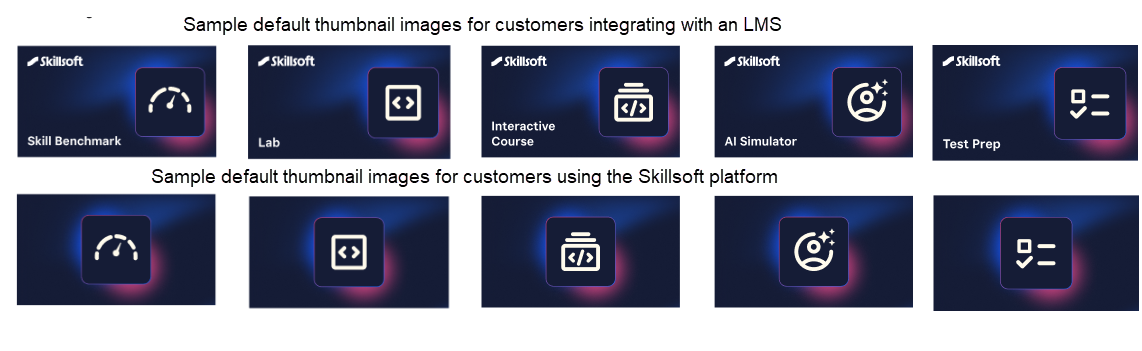
What this means for you:
- If you published custom content using custom images, those images are retained and there is no impact.
- If you previously published custom areas, subjects, channels, journeys, or content using the default image, the image will be automatically updated to the new default image for that asset type and display to learners. No action is required. Custom asset types that are impacted include: videos, courses, AI Simulators, books, channels, journeys, certifications, labs, challenges, live learning content, learning programs, skill benchmarks, documents, presentations, custom content, and more.
- When you create new custom items, the new default image displays. As has always been the case, you can replace the default image with your own image to best reflect the content, brand, and culture of your organization.
- Customers who integrate with another LMS users, will see different default thumbnails that clearly indicate the asset type for easier identification and management.
Prepare Now: New design for completion certificates and new customization experience
On June 16, we announced a new design for completion certificates with the ability for you to customize it before learners start seeing the new certificates. With this release,
- The old certificate configuration area is removed from the Site branding page.
- You can now modify all completion certificates. Navigate to Site Settings > Certificate customization to get started.
Learners will start receiving the new certificate design for any completions starting June 30, 2026. If a learner previously downloaded a completion certificate, that certificate remains cached for 30 days, so they may continue to see the old design through July 29, 2026 unless they redownload it.
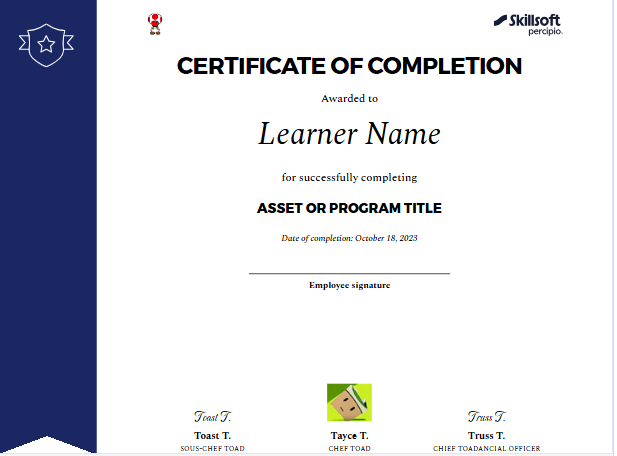
With the new customization experience, you can:
- Create a different completion certificate for different content types.
- Choose what information displays on the certificate, such as up to three different signatures, duration, content type, and certificate number.
- Add colors and logos
Coming Soon: New Library browse experience
We are planning to introduce an updated Library experience with the goal of making it easier for learners to find relevant content, navigate more intuitively, and focus on the skills most relevant to them.
Before we reintroduce the new experience, we will provide:
- Preview materials and documentation
- Guidance for communicating changes to learners
When we introduce the new design in the platform, it will become the standard experience. Our goal is to ensure your team has the advance notice, guidance, and support needed to prepare and adopt it successfully. More details to come.
Analytics Updates
The items in this section showcase changes to reports and dashboards to help you more effectively and efficiently manage your programs.
User Summary report now includes external and total learning hours
You can now view External Learning Hours and Total Learning Hours as optional columns in the User Summary report, providing a complete picture of all learning time recorded within a selected time frame.
- External Learning Hours: displays hours logged from external learning sources within the selected date range
- Total Learning Hours: the sum of Learning Hours + External Learning Hours
Coming Soon: Journey Detailed Export report for multiple journeys, and decommissioning of existing journey reports
Soon, you will be able to export detailed data for multiple Journeys at once into a single CSV file, enabling you to compare performance across Journeys more easily and to run your own analytics outside the platform to better measure learning impact across programs. You can schedule recurring exports and save templates so that your preferred filters and settings are reused automatically, reducing manual setup each time you need updated data.
On the heels of this new report coming out, we will be decommissioning the Journey Detail by User, Journey Summary, and Journey Summary by User reports to make way for new report features that better serve your needs.
Manage, promote, and measure learning
The items in this section provide the tools you need to manage users and content, promote learning, and measure learning effectiveness on your bottom line.
Revoke Completion at asset level
To help you maintain accurate, compliant training records, you now have the ability to revoke a completion that was made in error through the Waivers and Completions feature. This feature allows admins to grant a waiver or completion for a specific asset to a specific learner.
To learn more about how to revoke a completion and what happens when you do, access Learning > Waivers and Completions.
Custom role limit increased from 5 to 15
You can now create up to 15 custom admin roles in Percipio, increased from the previous limit of 5. This gives you more flexibility to design granular permission structures that match how your organization manages learning (for example, separate roles for regional admins, business unit owners, or specialized content curators).
LX Design Studio and Page Builder Enhancements
The items in this section pertain to customers who have licensed the full Skillsoft Platform which includes LX Design Studio, a suite of AI-driven apps and tools that allows you to easily design custom content tailored to your organization's policies, programs, and skills. It also includes Page Builder, a tool that allows you to create custom landing pages within the platform for specific groups of learners offering guidance and direction.
Create CAISY for Conversations from Skillsoft CAISYs or pre-existing custom CAISYs
You can now create a CAISY for Conversation using a Skillsoft CAISY AI scenario or a previously created custom CAISY for Conversation as a starting point. This gives you a solid foundation to start with the ability to add your unique industry, culture, and situations.
For more details, please see the Create CAISY for Conversation.
Page Builder supports multiple languages
When you create custom landing pages using Page Builder, you can now offer those pages in the learners local language. This helps you reach a broader global audience by removing language barriers and makes content accessible to non-native speakers who may struggle with a single-language site.
After you create a page structure, you can add languages. When you turn on the setting, AI translations in Page Builder, you have the option to let AI do the translation for you. All pages within the set that you select get translated. You also set the default language that learners see if you do not offer pages in their local language. You must publish the pages for the changes to take affect.
For more details, please see the Create New Pages or Edit Pages.
New email and in-app notifications
To help you better govern content workflows and keep creators and collaborators informed, this release introduces several new notifications. These notifications follow your existing roles and permissions for creators and publishers.
The following events in LX Design Studio now trigger both an email and an in-app notification:
- Content move: The creator of the content receives notification when someone moves their content to a different project. The notification contains the name of the person who moved the content, the content title, and the project.
- Content deletion: The creator of the content receives notification when someone deletes their content. The notification contains the name of the person who deleted the content and the content title.
- Ready to Publish: All publishers in the workspace receive notification when a user who is a creator without publishing rights marks content as “Ready to Publish. The creator is copied on the email notification.
The following event in LX Design Studio now triggers an in-app notification only:
-
Resolved comment: All contributors on the resolved comment thread receive notification when someone marks the comment resolved. The notification identifies who resolved the comment and the title of the content.
Custom LXDS Policy
You can now define and enforce a custom LX Design Studio policy so your legal, compliance, and governance requirements are acknowledged before anyone accesses LX Design Studio. This custom policy displays in addition to the standard Skillsoft policy.
Create and manage a custom LXDS policy under Site Settings > Policy Management > Custom Policies. You can localize your policy so learners see the correct version based on language selection.
Learners see the both policies the first time they enter LX Design Studio and can always access the active policy via the footer link on the LX Design Studio Home page.
Coming Soon reminders, in case you missed it
The items in this section highlight changes to AI elements in the platform so you can stay in compliance with your internal processes and guidelines.
Coming soon: Set data retention period for Skillsoft Conversation AI Simulator (CAISY™)
When you allow Skillsoft to collect the learner side of the conversation during a CAISY interaction, you now have the ability to set how long Skillsoft retains that data. When AI optimization and improvements setting is on, by default, Skillsoft retains the data for 180 days. You now have the option to reduce it to 30, 60, or 90 days.
Please note that if you do shorten the retention period, you may limit our ability to improve AI feedback and accuracy and learners only see their conversation history for that retention period.
Coming soon: AI-enabled certification data capture and validation for file uploads
When learners upload certification files AI will automatically capture certification details and confirm that the uploaded file represents a professional certification, avoiding reliance on manual entry and improving accuracy and consistency at the point of submission.
Learners can review and adjust the extracted information before submitting. This enhancement gives managers and HR greater confidence in the validity of uploaded certifications while ensuring more complete and representative certification reporting.