New Features and Enhancements as of October 6, 2026
Foundational enhancements for all
The items in this section apply to all customers who have the Skillsoft Percipio Platform.
 Update: Security questions as a password recovery method retirement delayed
If your company uses security questions and answers (knowledge-based authentication) as a password recovery method for users who do not have an email address on their Skillsoft Platform account, consider using an alternate method. Because knowledge-based authentication relies on information that may be publicly available, exposed through data breaches, or obtained through social engineering, it is no longer recognized as a secure option for password reset.
As part of ongoing security and compliance efforts, Skillsoft suggests not using this capability in favor of stronger authentication and recovery approaches, such as single sign-on.
Enhancements for features existing on your platform
If your Skillsoft Percipio platform currently has the features pertaining to the items listed in this section, you see the following enhancements in addition to the foundational enhancements.
Scheduled reports can now retain date range filter from template
When you schedule a report, you can now choose whether the report uses a recommended date range that overwrites what you defined in your template (current behavior) or retains the date range you set in the report template. Use the new Date range mode setting to set your preference. When you set it to Retain report date range, the scheduled report uses the date filter you defined in the report template. This helps keep your custom reporting workflows consistent between the schedule and the template. When you keep the setting on Recommended, the default setting and current behavior, you overwrite the date range set in the template with the one you define for the scheduled report.
New completion setting for files and linked custom content items
You now see a new completion setting when you create a new custom file or link from the custom content items workflow. The new completion setting is for admins to grant the completion through the completion and waivers flow. This is in addition to the current settings: learners receive completion upon opening the item, or learners receive completion after they mark it complete. Existing content items retain their current settings.
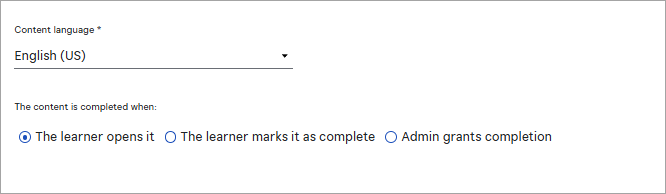
You can also define the default setting that is selected when you create new files or links. From Site Settings > Site Configuration > Completion settings > Document & Link completion modes, choose whether the default setting is that learners self-attest completion or that only administrators can grant completion. An admin can override the default setting when creating any custom file or link.
This update gives you more control over how training is tracked. The Detailed Activity Report shows whether a completion came from a learner or an administrator.
Additional enhancements for those with the full platform
The items in this section pertain to the fully licensed version of the Skillsoft Percipio Platform which includes LX Design Studio, AI Coach, and Page Builder. Customers with this level of access get these features and enhancements in addition to the ones above.
AI model updates
Originally targeted for October 2, now to be fully completed by October 13: AI model updates for LX Design Studio and all its apps
To keep your LX Design Studio experience current with the latest AI advancements, updated the AI conversation models that power LX Design Studio and all its apps (including Course Designer, CAISY for Conversations, CAISY for Presentations, and Assessments).
Learners are not likely to notice any changes in how these features behave, but you benefit from the latest updates in AI across your learning ecosystem. Skillsoft is committed to staying current with the latest advancements in AI technology, ensuring that we continue to provide you with the best possible security and user experience. If you need additional information about this planned update, please contact your Skillsoft account team.
AI model updated for image generation in the Media Library
We updated our AI model for LX Design Studio's image generation feature. Authors are not likely to notice any changes when interacting with this feature.
This update is part of our commitment to staying current with the latest advancements in AI technology, ensuring that we continue to provide you with the best possible security and user experience. If you require additional information, please reach out to your Skillsoft account team.
General platform features
Prepare now: New Communities feature
Help your organization increase learner engagement, improve knowledge retention, and build a culture of peer-to-peer learning with the new Communities feature. This feature enables learners with permissions to form communities. They might form a community for a particular course discussion, topic, or skill, fostering collaboration and social learning within the platform.
With this release, you see new administrative settings and permissions that you can configure prior to the Community feature going live to learners on October 20, 2026. The Communities feature is on by default and is located at: Site settings > Engagement > Social learning > Communities.
When the Communities setting is on, you see the following throughout the platform:
- New User privilege when creating or editing a user: Allow community creation. This user privilege only shows for users with the platform user role of learner, manager, content coordinator, and content curator. The site admin and learning admin roles have the permissions to create and manage communities on by default for their role. You can manage the communities permission for site admins and learning admins through role customization.
- New role customization options under Learning Management section for learning admins, domain admins, and site admins along with custom roles, called:
- Manage community creation: Allows the role to create communities.
- Manage community moderation: Allows the role to manage reported community posts.
- From the admin left navigation menu, under Learning, user roles with permissions to manage communities, see the Communities Management option.
- From the learner view of the left navigation menu, users see the Communities option. This page is where they can create communities, join communities, start discussions or posts, and respond to posts.
If you do not want your learners to engage with Communities, you can turn the main setting off now. If you turn it off, you no longer see the community settings in User Management or Role Customization.
To ensure your team is ready for Communities when it gets enabled for learners on October 20, 2026:
- Keep the new setting turned on: Site settings > Engagement > Social learning > Communities.
- Check the privilege for users who should be allowed to create communities: Users > User Management > Edit User > Allow community creation.
- Check role customizations to ensure each learning or site admin custom role is set for monitoring community posts. You can enable or disable this feature for each custom role from the Learning Management section under Role customization.
Add instructors without Percipio user accounts to live courses
You can now add external instructors, such as guest speakers, contractors, and third-party vendors, directly to your instructor-led training (ILT) classes without requiring them to have a Skillsoft Percipio Platform user account.
When scheduling an ILT class, you can add an external email address in the Instructor field. After you do that, the instructor gets:
-
Automated calendar invites: The platform automatically adds the external instructor as a participant to the class and they receive all instructor email notifications and meeting invitations.
-
Co-organizer access: If you have an MS Teams integration configured for the class, the external instructor becomes a co-organizer in the auto-created Microsoft Teams meeting, ensuring they receive the official meeting invitation and can facilitate the session.
-
Added to the roster: The external instructor appears within the session roster and class details, giving platform administrators clear visibility and tracking for all session facilitators in one place.
Note: For organizations with Microsoft Teams integration enabled, external instructor email addresses are validated against your configured MS Teams tenant.
Skillsoft Coaching
For customers of Skillsoft Coaching, this section reports on changes made to Skillsoft Coaching and the platform to support the interaction.
For details on these enhancements, please see the Coaching Knowledge Base.
Send customized emails from the Enterprise dashboard
You can now send personalized emails to learners directly from the Skillsoft Coaching Enterprise Dashboard to streamline outreach without leaving the platform. You can find this option in three places on the Enterprise Dashboard: User Metrics, Needs Attention, and Assessment Only.
Select one or more active learners, choose Email learners, and compose your message in the modal. You can customize the sender name, add a required subject and message, and included is <<Learner Full Name>> to personalize the email. This feature is available for active learners in Onboarding, Steady State, and Remeasurement tabs. It is not available for inactive or completed users.
You can review emails that were sent using the Skillsoft Platform Email notification report and filtering on the Coaching Admin Outreach campaign.
Coming Soon reminders, in case you missed it
The items in this section highlight changes to AI elements in the platform so you can stay in compliance with your internal processes and guidelines.
Coming later in October: New Content Listing reports and retiring of existing reports
Coming soon, you will see three new content reports that make it easier to review and manage content across your site:
- All Content Library Export: This report will replace the All Content Listing report. In addition to the existing functionality, it will allow you to view videos and modules. This is only available for export because of the potential size of the report.
- All Content Listing by Title: This report contains a full list of all content on your site by title. For each content item you have more flexibility on filtering and can see more content metadata such as retirement information, first/last published dates, and last modified dates.
- All Content Listing by Container: The report will replace the Content Status report and improve how you identify the containers where content that is scheduled for retirement exists.
The existing Retired Content report will be updated with all content that has been retired. It will no longer just include accessed content from your site that has been retired.
As part of this enhancements, both the All Content Listing and Content Status report will be retired. Your existing schedules for these reports will continue to run even after retirement.
Coming later this year: Channel page user enhancements
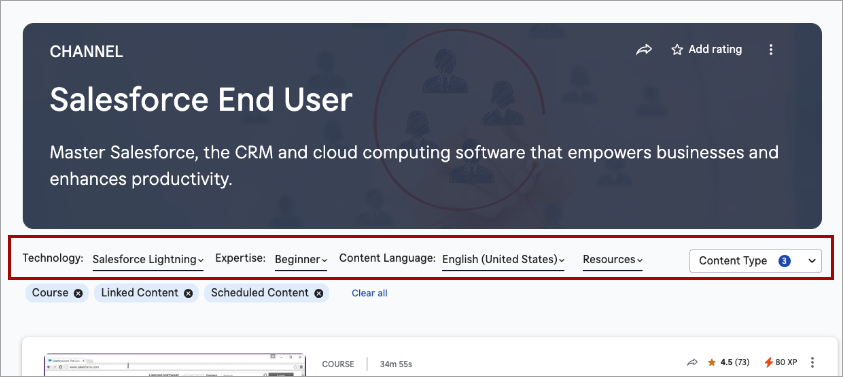
To help learners more easily locate content within a channel, they will soon see enhancements to the Channel pages of the Library, including:
- The channel filters, such as expertise level, duration, and source, which previously displayed in the banner, now display in the page content area, where they sit between the banner and the content list. The simplified banner now only shows the channel title, description, and hero image/background.
- The modality tabs no longer display. All content shows in one list.
- A new Content type filter that mimics the Content type filter on Search display alongside the channel filters. All content types contained within the channel are shown by default, but learners can filter on just the content types they want to see.
- Learners can use Load More to progressively browse content without a full page refresh. The first set of results loads initially, and additional items are appended as they are requested.
Coming soon: Run reports using natural language with AI Assistant
You will soon be able to use the AI Assistant to run, download, and schedule analytics reports using natural language. The AI Assistant may help identify the appropriate report, apply supported filters, and return results without requiring manual report configuration.
With this enhancement to the AI Assistant, you can:
- Run analytics reports using natural language prompts.
- Download report results as CSV files.
- Schedule report delivery by email on a one-time, daily, weekly, or monthly basis.
Natural language filtering currently supports date ranges, audiences, users, and content titles. Report scheduling is available for Standard Reports and Skillsoft Template Reports; custom templates are not currently supported. AI Assistant does not currently return dashboards.
So we can continually improve, please submit feedback using the thumbs up/down icon in the response.
Coming Soon: New Library browse experience
We are planning to introduce an updated Library experience with the goal of making it easier for learners to find relevant content, navigate more intuitively, and focus on the skills most relevant to them.
Before we reintroduce the new experience, we will provide:
- Preview materials and documentation
- Guidance for communicating changes to learners
When we introduce the new design in the platform, it will become the standard experience. Our goal is to ensure your team has the advance notice, guidance, and support needed to prepare and adopt it successfully. More details to come.
Coming soon: AI-enabled certification data capture and validation for file uploads
When learners upload certification files AI will automatically capture certification details and confirm that the uploaded file represents a professional certification, avoiding reliance on manual entry and improving accuracy and consistency at the point of submission.
Learners can review and adjust the extracted information before submitting. This enhancement gives managers and HR greater confidence in the validity of uploaded certifications while ensuring more complete and representative certification reporting.