New Features and Enhancements as of March 24, 2026
Analytics Updates
The items in this section showcase changes to reports and dashboards to help you more effectively and efficiently manage your programs.
 Column name change in Detailed Activity, Learner Activity, and Internal and External Activity reports
The column labeled Child content was renamed to Consumed in Course. This change impacts the Learner Activity, Detailed Activity, and Internal and External Activity reports. This column is off by default.
This name change helps you better distinguish how learners launched the content, either from within the course or independently in the separate player.
New Content title filter for the Internal and External Activity report
You can now generate a more accurate and comprehensive Internal and External Activity report with the new Content title filter. Using this filter in combination with the filters for date range, user, and audience ensures you get a report that helps you comply with audits and other regulations.
Skill Benchmark Learner Details report and Skill Benchmark Dashboard have a new filter interface
With this update, you have a more streamlined and user-friendly way to filter data for both the Skill Benchmark Learner Details report and the Skill Benchmark dashboard. All existing filters now display under one component leaving more space on the page for you to view report data.
To use the new filters, open the filter drop down, choose all your filters, and select Apply filters to update the data shown on the page.
User Summary report now displays XP
A new column, Total XP Earned is now available in the User Summary report. This column does not display by default. The column allows you to view the total experience points (XP) earned by learners over a selected time period, providing deeper insights into their engagement and achievements.
Expanding skills of your workforce
The items in this section provide ways to grow your talent and fill critical skill gaps, building mastery with confidence.
Enhancement to Certification upload: List of issuing bodies updated
When learners add a certification to their learning record, they can now choose from over 200 issuing bodies. If the issuing body they need does not show in the list, they can select one of the options for Other.
When AI-enabled certification data capture and validation for file uploads is available, AI will validate the issuing body.
Role Advisor focus card enhancements
The focus skill cards on the Role Advisor page now have a cleaner design, with the removal of icons from titles and descriptions for a more concise presentation and an updated color palette. In addition, learners now see a skill gain indicator (green arrow) whenever there is activity against a skill.
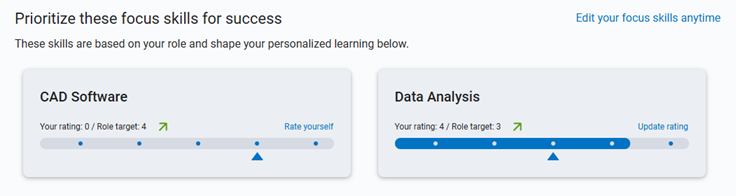
These updates provide a more streamlined and visually appealing interface for learners, helping them to better identify and track their skill development.
Manage, promote, and measure learning
The items in this section provide the tools you need to manage users and content, promote learning, and measure learning effectiveness on your bottom line.
Copy managers on learner’s assignment email reminders
When you set up notifications for an assignment, you can choose to send the learner’s manager a copy of the reminder. The manager that gets a copy is the person specified in the Direct Manager attribute of the learner.
You can choose to copy the manager on either or both reminders: prior to the due date or after the due date. The setting is off by default so reminders for existing assignments only go to the learner, not to their managers.
For more information, see Create assignments.
Coming Soon
This section provides advanced notice of features that are shipping soon. These features could impact the way your company uses the site so we want to provide advanced notice.
Coming in June: Instructor-Led Training (ILT) Control Center (Custom ILT Administration Update)
ILT Administration, now called the ILT Control Center, is getting a redesigned, insight‑driven experience that makes managing live training faster and more intuitive. A new dashboard surfaces actionable insights—like learners awaiting approval, low‑enrollment classes, missing attendance, and courses that need new classes—so administrators can act immediately. Clear, tabbed navigation now separates courses and classes, with enhanced tables, smarter search, persistent filters, and a dedicated drill‑down for all classes for complete visibility. Together, these updates reduce admin effort, preserve context as you work, and give you sharper control over ILT scheduling, enrollment, and outcomes.
Prepare now with a new admin setting for personalized search
Coming soon, learners will see a new search filter called Personalized search unless you disable it for your site. When learners turn on the filter, they will see more relevant and meaningful search results tailored to their specific job role. The new filter will retrieve up to 60 search results based on the learner’s search query and will re-rank them using an LLM that takes into consideration the learner's job role context. The re-ranked results ensure that higher-quality, role-relevant items display at the top, improving engagement and learning outcomes. Note that personalization affects the ranking of search results, not their visibility.
With this release, you will see a new admin setting, Enable personalized search, that will be on by default. Before the feature goes live for learners, you can choose to disable the Personalized search filter for your organization. We recommend that you keep it on to help ensure learners see the most relevant content for their needs.
You can locate the new setting at: Site settings > Site Configuration > AI Settings > Personalized search
Compliance, Ecosystems, and Integrations
The items in this section help you to integrate Skillsoft platform across your learning ecosystem and promote how Skillsoft works with its partners.
Updated language equivalency completion logic when content is launched from another LMS
With this release, the way the Language Equivalency Completion setting reports completions has been updated for sites with a third‑party LMS integration. Now, when a learner launches a course from your LMS and completes it in another language, the LMS receives a completion for both the language completed and the course language that was originally launched or assigned.
This change ensures assignments are marked complete regardless of language choice, supporting global learners without disrupting compliance or LMS reporting. Previously, only the U.S. English course completion was sent back to the LMS.
This change means you can assign any course with the language equivalency completion setting enabled, and when learners launch the course from the assignment, they will receive a completion regardless of the language they choose to take it in. This update ensures more accurate tracking of learner progress across different languages.
Mobile App Updates and Enhancements
The items in this section pertain to the Skillsoft Percipio Platform mobile app.
Mobile app supports branding for tab bar and header
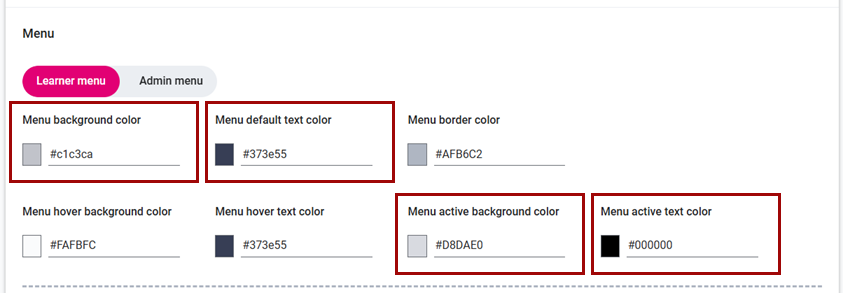
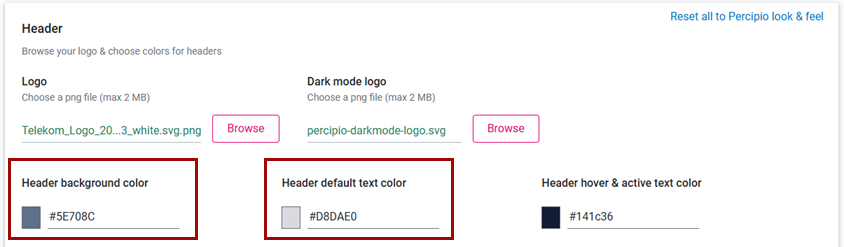
With this update, the tab bar and header in the mobile app now use the following settings from Site Settings > Site Branding:
- Menu active background color for active tabs and Menu background color for inactive tabs
- Menu active text color for text and icons on active tabs and Menu default text color for text and icons on inactive tabs.
- Header background color and Header default text color for icons and text
in the headers.
The changes are applicable only in light mode on the app.
This enhancement is designed to ensure a cohesive look and feel across the web and mobile versions of the platform that aligns with your organization's visual identity.
General announcement
This section contains general notifications about how Skillsoft supports our customers.
Updated Accessibility Conformance Report for Skillsoft Percipio Platform
An updated Percipio Learning Platform WCAG 2.2 Accessibility Conformance Report is now available, dated 16 Feb 2026. This update is based on the findings from both an internal audit and a third-party external audit of the entire platform and its content. This ensures that the platform continues to meet high accessibility standards, providing an inclusive experience for all users.
For more details on accessibility settings and conformance reports, see Accessibility.
Reminders, in case you missed it
The items in this section highlight changes to AI elements in the platform so you can stay in compliance with your internal processes and guidelines.
Coming soon: Set data retention period for Skillsoft Conversation AI Simulator (CAISY™)
When you allow Skillsoft to collect the learner side of the conversation during a CAISY interaction, you now have the ability to set how long Skillsoft retains that data. When AI optimization and improvements setting is on, by default, Skillsoft retains the data for 180 days. You now have the option to reduce it to 30, 60, or 90 days.
Please note that if you do shorten the retention period, you may limit our ability to improve AI feedback and accuracy and learners only see their conversation history for that retention period.
Coming soon: AI-enabled certification data capture and validation for file uploads
When learners upload certification files AI will automatically capture certification details and confirm that the uploaded file represents a professional certification, avoiding reliance on manual entry and improving accuracy and consistency at the point of submission.
Learners can review and adjust the extracted information before submitting. This enhancement gives managers and HR greater confidence in the validity of uploaded certifications while ensuring more complete and representative certification reporting.
Coming April 4, 2026: AI Model updates for two Aspire journeys
We will soon be updating our AI models for two Aspire journeys, Learn Python with AI and AI-Assisted Front End Development. In these journeys, learners use Codex CLI as development partners—mastering Python fundamentals or front-end development with React while building the critical evaluation skills needed to review and improve AI-generated code. It is this interaction with Codex that will be updating models. All other Codecademy AI interactions remain on the current model, including the Codecademy AI Assistant.
Learners are not likely to notice any changes when interacting with these journeys except that the new model number will display.
This update is part of our commitment to staying current with the latest advancements in AI technology, ensuring that we continue to provide you with the best possible security and user experience. If you require additional information, please reach out to your Skillsoft account team.
Coming April 4, 2026: New Aspire journey using AI text embedding models
In our latest Aspire journey, Build Applications with LangChain and LangGraph, your learners will have the chance to experience text embedding models alongside other AI offerings, such as the AI Assistant and Codex.
You automatically get this new journey with your Technology and Developer Skills Suite. You must have AI content enabled on your site and the collection entitled in order for learners to be able to see it.