New Features and Enhancements as of July 14, 2026
AI Updates
The items in this section highlight changes to AI elements in the platform so you can stay in compliance with your internal processes.
 Targeted for July 11, 2026: AI model updates for CAISY™ AI Simulator
As previously announced, we are planning to update our AI conversation models for CAISY AI Simulator. The date we are targeting is July 11, 2026. We will be updating the model for text conversation.
Learners are not likely to notice any changes when interacting with any of these features.
This update is part of our commitment to staying current with the latest advancements in AI technology, ensuring that we continue to provide you with the best possible security and user experience. If you require additional information, please reach out to your Skillsoft account team.
Targeted for July 11: AI model updates for AI Assistant
We are targeting to update our AI conversation models for AI Assistant on July 11, 2026. Learners are not likely to notice any changes when interacting with any of these features.
This update is part of our commitment to staying current with the latest advancements in AI technology, ensuring that we continue to provide you with the best possible security and user experience. If you require additional information, please reach out to your Skillsoft account team.
Coming Soon
This section provides advanced notice of features that are shipping soon. These features could impact the way your company uses the site so we want to provide advanced notice.
Targeted for July 7, 2026: Changes to Skillsoft-provided default thumbnail images
To improve accessibility and deliver a more consistent, language-neutral experience for your learners, we will be changing the default thumbnail images that show for custom areas, subjects, channels, journeys, dynamic content, and content items. This also applies to Skillsoft-provided default thumbnails such as Skill benchmarks, videos, test preps, and labs.
The new default thumbnails:
- Meet accessibility (A11y) standards to better support all learners.
- Remove embedded English text so they are locale-agnostic and appropriate for all supported languages.
- Provide a more consistent visual experience across the platform, regardless of asset type.
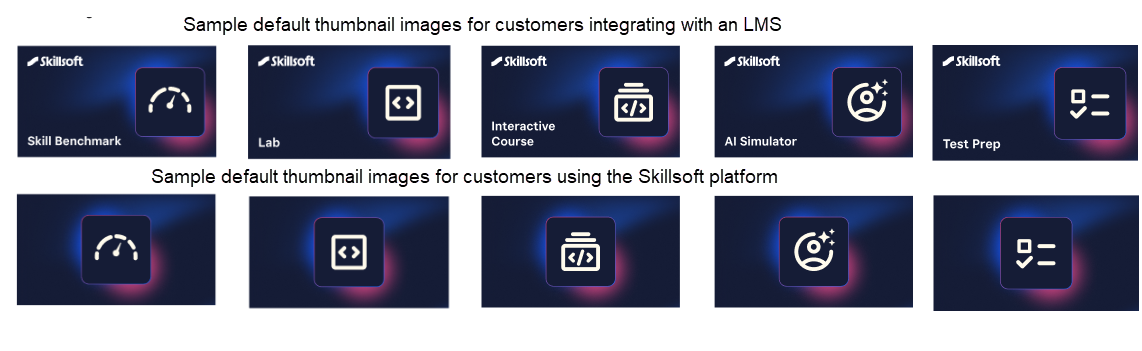
What this means for you:
- If you published custom content using custom images, those images are retained and there is no impact.
- If you previously published custom areas, subjects, channels, journeys, or content using the default image, the image will be automatically updated to the new default image for that asset type and display to learners. No action is required. Custom asset types that are impacted include: videos, courses, AI Simulators, books, channels, journeys, certifications, labs, challenges, live learning content, learning programs, skill benchmarks, documents, presentations, custom content, and more.
- When you create new custom items, the new default image displays. As has always been the case, you can replace the default image with your own image to best reflect the content, brand, and culture of your organization.
- Customers who integrate with another LMS users, will see different default thumbnails that clearly indicate the asset type for easier identification and management.
Engaging your learners to build a learning culture
The items in this section provide ways to engage your users so they want to learn and make learning a habit.
Manager Dashboard Enhancements: New roles and team member details
This release finds the following enhancements to the Manager Dashboard if the Manager Dashboard setting is turned on:
- Users with any admin role who are named in the Direct Manager attribute of another user and are an owner of an audience with those users in it, can now access to the Manager Dashboard from the left navigation.
- From the My Team tab, managers can now see details for each individual member of their team including overdue assignments, progress on learning goals, time spent learning, XP and badges earned, completions, and date last accessed.
Learners start receiving the new design for completion certificates
On June 16, we announced a new design for completion certificates with the ability for you to customize it before learners start seeing the new certificates. With this release, learners will start receiving the new certificate design for any completions starting June 30, 2026. If a learner previously downloaded a completion certificate, that certificate remains cached for 30 days, so they may continue to see the old design through July 29, 2026 unless they redownload it.
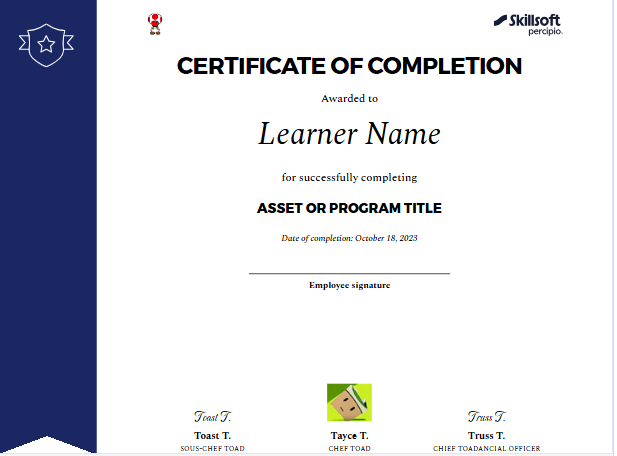
With the new customization experience, you can:
- Create a different completion certificate for different content types.
- Choose what information displays on the certificate, such as up to three different signatures, duration, content type, and certificate number.
- Add colors and logos
Analytics Updates
The items in this section showcase changes to reports and dashboards to help you more effectively and efficiently manage your programs.
Journey Detailed Export report for multiple journeys, and decommissioning of existing journey reports
To give you richer analytics across multiple learning journeys, you can now export a new Journey Detailed Export report. This new report supports all existing Journey filters and lets you pull consistent, granular data for several journeys at once and use it in your own tools or reporting workflows.
It expands your ability to compare and analyze journey performance side by side. You can also take advantage of scheduling and templates to automate recurring exports, ensuring your downstream analytics stay up to date without manual effort.
When this new report comes out, the Journey Detail by User, Journey Summary, and Journey Summary by User reports will no longer be available. Any custom reports you created based on these report templates remains in tact. Going forward, the information that was in these reports is available in the Journey Activity and Journey Detailed Export reports.
Share report schedule to scoped audience of that user
To give you more control over what data other admins and stakeholders see in scheduled reports, you can now choose whether each shared scheduled report delivers data scoped to each recipient’s own permissions or to the full organization-wide data set. This helps you reuse a single scheduled report across multiple admins and audiences while maintaining the right level of data visibility for each recipient. This capability is also available when you share a report template.
When you open the Share scheduled report dialog, you now see a new Data Access Options section with two radio buttons:
- Restricted (default): Each recipient only sees data based on their existing audience permissions. For example, a department head for APAC only sees APAC data, even if you have org-wide access.
- Global: Recipients see report data from all learners in the organization in a view-only mode, regardless of their own access level.
Existing shared reports will assume the restricted setting. You can change it back to the global setting.
Product Retirement Notice
This section contains notifications regarding Skillsoft products and services that are nearing retirement.
Apple TV App Retiring: Use AirPlay Casting instead
Because of its very low usage rates, we will be retiring the Skillsoft Percipio Apple TV app. You can enjoy the same visual learning experience when you use the Skillsoft Percipio mobile app with AirPlay casting. AirPlay casting gives you a seamless, full-featured learning experience directly from your device to your big-screen television.
What’s Changing
The Apple TV app will no longer be available for download after July 14, 2026. If you currently have the app installed, you can continue using it, however, it will no longer be supported should you encounter any issues.
Get Started with AirPlay Casting
Switch to AirPlay casting for a more flexible, streamlined experience:
- Open the Skillsoft Percipio mobile app on your device
- Select content to learn
- Use AirPlay casting to stream to your Apple TV or any AirPlay-compatible screen
If you have any questions about this transition, contact Skillsoft Support.
LX Design Studio and Page Builder Enhancements
The items in this section pertain to customers who have licensed the full Skillsoft Platform which includes LX Design Studio, a suite of AI-driven apps and tools that allows you to easily design custom content tailored to your organization's policies, programs, and skills. It also includes Page Builder, a tool that allows you to create custom landing pages within the platform for specific groups of learners offering guidance and direction.
Upload media files from your mobile device to the Media Library
With this update, creators can add real-world photos, videos, and audio files from their phones or mobile devices directly into LX Design Studio without the need of a mobile app or extra transfer tools. This makes it easier to capture on-the-floor demonstrations, field work, and other just-in-time learning moments and turn them into course content in seconds.
When working to add files to the Media Library or Projects, you see a new option called: Add media from phone. When you select this option, LX Design Studio generates a secure, pre-signed upload URL and displays a QR code that creators can scan with their phone. From your mobile device, select the file. You only have the option to select the type of file you selected that you wanted to add.
The uploaded media displays in the Media Library as a pending item until the creator adds the title, description, and other details.
Add CAISY for Conversations to custom courses
You can now include CAISY for Conversations simulation scenarios directly in a custom course that you create with Course Designer. This makes it easier for you to deliver rich, scenario-based practice that builds your learners’ conversational and soft skills.
The CAISY is its own module within the course and gets published as part of the course. Learners can launch and complete the CAISY scenario from within the course for an integrated simulation-based learning experience.
For more details, please see Create a course.
Targeted for August 8, 2026 new AI model coming for creating images within the Media Library
You will soon have the option within the Media Library to create images using AI. Authors provide a text prompt, and AI creates the image which is automatically saved to the Media Library so they can be reused across content items like any other media asset.
The AI used to generate images has built-in safety guardrails powered by the Gemini Flash Image model to help you maintain a safe and compliant environment when authors generate images. The guardrails:
- Evaluate requests against safety policies (for example, inappropriate or unsafe content).
- Prevent an image from being generated when the request violates a guardrail
- Log system events whenever a guardrail is triggered, giving you better visibility into how the feature is being used and helping you monitor for potential misuse.
Learners ultimately see only the approved images that authors select and publish in their content, providing a safer and more consistent visual experience. For more details, please see the knowledge base.
View all LX Design Studio activity from the Activity tab on the Admin dashboard
You can now access a centralized, organization-wide audit log in the Admin Dashboard of LX Design Studio to strengthen governance, support compliance reviews, and investigate incidents without needing assistance from Skillsoft.
With the new Activity tab you can:
- View a consolidated record of platform activity across all LX Design Studio apps for the last 90 days. There may be up to a 24 hour delay before activity is recorded in the log.
- See key details for each event, including timestamp, user, action taken, item type, and a brief detailed summary.
- Filter the log by search, date range, workspace, user, action, content type, and item type so you can quickly focus on relevant activity.
- Export any filtered view of the log for offline analysis, audits, or sharing with other stakeholders.
New email and in-app notifications
You now have a more transparent and reliable notification experience across projects, workspaces, and content in LX Design Studio. These updates ensure that users always know when their access changes or when content status is updated, reducing confusion and support requests.
With this release, the following events in LX Design Studio now trigger both an email and an in-app notification to the user impacted by the event letting them know what changed and who did it:
- When a user is removed from a project
- When a user’s project privilege changes
- When a user is removed from a workspace
- When a user’s workspace access type changes
Also, the following events in LX Design Studio now trigger both an email and an in-app notification:
- Content archived: The creator of the content receives notifications when someone archives content they created. They are informed of who archived it and the content’s title.
- Content is published or republished: Both the content creator and the publisher receive notification that the content has been published or republished,. If the publisher and content creator are the same person, the individual receives only a single, correct message.
For more information on all LX Design Studio notifications, see Notifications.
Coming Soon reminders, in case you missed it
The items in this section highlight changes to AI elements in the platform so you can stay in compliance with your internal processes and guidelines.
Coming Soon: New Library browse experience
We are planning to introduce an updated Library experience with the goal of making it easier for learners to find relevant content, navigate more intuitively, and focus on the skills most relevant to them.
Before we reintroduce the new experience, we will provide:
- Preview materials and documentation
- Guidance for communicating changes to learners
When we introduce the new design in the platform, it will become the standard experience. Our goal is to ensure your team has the advance notice, guidance, and support needed to prepare and adopt it successfully. More details to come.
Coming soon: Set data retention period for Skillsoft Conversation AI Simulator (CAISY™)
When you allow Skillsoft to collect the learner side of the conversation during a CAISY interaction, you now have the ability to set how long Skillsoft retains that data. When AI optimization and improvements setting is on, by default, Skillsoft retains the data for 180 days. You now have the option to reduce it to 30, 60, or 90 days.
Please note that if you do shorten the retention period, you may limit our ability to improve AI feedback and accuracy and learners only see their conversation history for that retention period.
Coming soon: AI-enabled certification data capture and validation for file uploads
When learners upload certification files AI will automatically capture certification details and confirm that the uploaded file represents a professional certification, avoiding reliance on manual entry and improving accuracy and consistency at the point of submission.
Learners can review and adjust the extracted information before submitting. This enhancement gives managers and HR greater confidence in the validity of uploaded certifications while ensuring more complete and representative certification reporting.
♦On pause for now. We spotted something that didn’t meet our standards, and we’re working on it.