New Features and Enhancements as of September 8, 2026
Foundational enhancements for all
The items in this section apply to all customers who have the Skillsoft Percipio Platform.
 Action Required: Retirement of security questions as a password recovery method
If your company uses security questions and answers (knowledge-based authentication) as a password recovery method for the Percipio platform, please be aware that on October 6, 2026, Skillsoft will retire this option from the platform. Because knowledge-based authentication relies on information that may be publicly available, exposed through data breaches, or obtained through social engineering, it is no longer recognized as a secure option for password reset. As part of ongoing security and compliance efforts, Skillsoft is retiring this capability in favor of stronger authentication and recovery approaches.
After the retirement date, users will no longer be able to recover passwords using security questions, and existing security question and answer data will be removed.
Action required: Review your authentication and recovery processes now and ensure users have access to alternative recovery methods, such as SSO or organization-managed identity providers.
Coming September 22, 2026: Channel page user enhancements
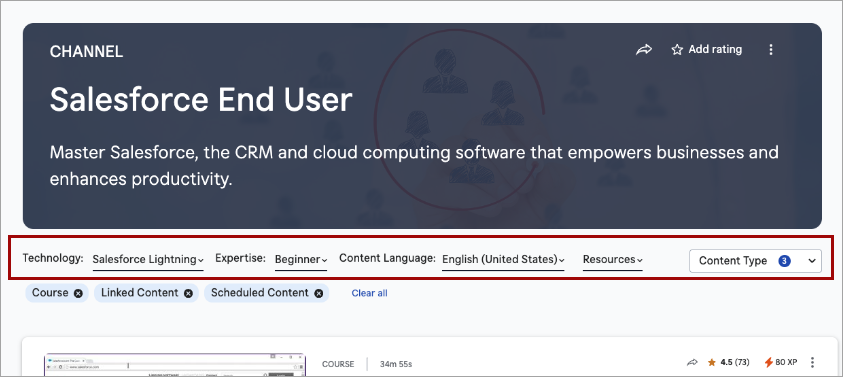
To help learners more easily locate content within a channel, we are introducing enhancements to the Channel pages of the Library. On September 22, 2026, you will see the following enhancements to the Channel pages:
- The channel filters, such as expertise level, duration, and source, which currently exist in the banner, will display in the page content area, where they will sit between the banner and the content list. The simplified banner now only shows the channel title, description, and hero image/background.
- The modality tabs will no longer display. All content shows in one list.
- A new Content type filter that mimics the Content type filter on Search will display alongside the channel filters. All content types contained within the channel are shown by default, but learners will be able to filter on just the content types they want to see.
- Learners will be able to use Load More to progressively browse content without a full page refresh. The first set of results loads initially, and additional items will be appended as they are requested.
Set data retention period for Skillsoft Conversation AI Simulator (CAISY™)
When you allow Skillsoft to collect the learner side of the conversation during a CAISY interaction, you now have the ability to set how long Skillsoft retains that data. When the AI optimization and improvements setting is on, by default, Skillsoft retains the data for 180 days. You now have the option to reduce it to 30, 60, or 90 days.
Please note, that if you do shorten the retention period, you may limit Skillsoft's ability to improve AI feedback and accuracy, and learners only see their conversation history for the length of the retention period.
Document Submission now supports Microsoft Excel and video formats
When you require learners to add a Document Submission file to prove their skill proficiency, they can now submit Microsoft Excel and video formats in addition to Microsoft Word, PowerPoint, and PDF files.
Supported Excel file types are .xls and .xlsx up to 10 MB, and supported video file types are .mov and .mp4 up to 100 MB.
After submission, you and learners can view uploaded files in full-screen mode from Learner Submissions and My Submissions respectively.
Content Integration now offers SCORM export support
To help you deliver content to your LMS platforms that require SCORM 1.2 or SCORM 2004, you can now export eligible custom content that you created with LX Design Studio and applicable Skillsoft content with a SCORM wrapper.
The SCORM-wrapped file you download is a small pointer file. It does not contain the course itself. When a learner clicks the content inside your LMS, it signs into the Skillsoft Percipio Platform, plays the content from the Skillsoft Platform, and reports progress back to the LMS. Because of that, the content only plays when there is a live connection to the Skillsoft Platform. This behaves the same way as an AICC file: you download an AICC package, load it into an LMS, and when a learner launches it, it opens the content through the Skillsoft Percipio Platform.
With this enhancement, you can:
- Bulk export SCORM wrapped files
- Download and share one or more assets
- Schedule SCORM-based exports
For more information, see Manage Your Content Rules.
Completion certificate enhancements
The custom completion certificate offers the following enhancements with this release:
-
A larger font size for the learner’s name helping to set it apart from other information on the page.
-
Vertical alignment of the bottom signatures to the logos at the top
-
A new option if you only add one logo, to either center that logo or keep it right-aligned.
New Badges Earned column now shows in all journey reports
You can now see earned badge data for both Skillsoft Aspire and custom journeys in the Badges Earned column of the By Journey tab in the Journey Activity report. Previously, you could only find badge earned data for journeys in the Learner Activity and Detailed Activity reports. This update makes badge reporting consistent across all reports wherever journey data is available.
Coming Soon: New Content Listing reports and retiring of existing reports
Coming soon, you will see three new content reports that make it easier to review and manage content across your site:
- All Content Library Export: This report will replace the All Content Listing report. In addition to the existing functionality, it will allow you to view videos and modules. This is only available for export because of the potential size of the report.
- All Content Listing by Title: This report contains a full list of all content on your site by title. For each content item you have more flexibility on filtering and can see more content metadata such as retirement information, first/last published dates, and last modified dates.
- All Content Listing by Container: The report will replace the Content Status report and improve how you identify the containers where content that is scheduled for retirement exists.
The existing Retired Content report will be updated with all content that has been retired. It will no longer just include accessed content from your site that has been retired.
As part of this enhancements, both the All Content Listing and Content Status report will be retired. Your existing schedules for these reports will continue to run even after retirement.
Enhancements for features existing on your platform
If your Skillsoft Percipio platform currently has the features pertaining to the items listed in this section, you see the following enhancements in addition to the foundational enhancements.
Prepare now: AI Settings for AI Assistant
The new AI Memory admin setting is currently visible only to administrators. The setting is on by default, but you can choose to turn it off before it goes live to learners later in September. With this setting, you can now choose whether the AI Assistant remembers helpful info from learners' past conversations to personalize future interactions. The new AI Memory setting is in Site settings > Site configuration > AI Settings. When on, the assistant will use prior conversation context for personalization; it will not store personal data like names or email addresses. When off, the assistant will not retain information between conversations.
Child sites can now inherit branding, user attributes, site settings, and audiences from parent site
You can now configure branding, site settings, user attributes, and audiences once on a parent site and push them down to selected child sites. The platform maintains any changes from the parent with a connection that syncs hourly with the child sites. This helps you manage your multi-site environment more consistently and efficiently.
The domain admin is the only role who can push settings to a child site. Branding, user attributes, audiences, and site settings are inherited top-down only, and child sites cannot push changes back to the parent or to other child sites. Site admins on the child site cannot edit branding, site settings, audiences, or user attributes that have been pushed from a parent. A domain admin can only push uninherited settings to a child site.
A few more details on inheriting:
-
Branding: When you push branding from the parent to a child site, all branding changes are included. If you make changes at the parent level, you are prompted to push the changes to the child.
-
User attributes: You can choose which user attributes you want to sync. A site admin cannot rename, edit, or delete an inherited user attribute. User attributes that are a list type carry a locked value list, which means the child site gets a read-only drop-down and admins can only assign existing values to users. User attributes that are string, date, or user type share the definition only; values are entered locally per user. Site admins can create other user attributes on a child site, which never propagate back to the parent.
-
Site settings: You select the grouping of site settings you want to push to the child site. Each child site can inherit different site settings. If a child site did not inherit a group of settings, the site admin can change those settings. You can select groups of site settings from the following Site Settings pages:
- Site configuration
- Security and login
- AI Settings
- Content settings
- Completion settings
-
Audiences: You can choose which audiences you want to sync. A site admin of a child site cannot rename or edit the rule set of an inherited audience, but they can add audience owners, administrators, and channels.
Coming soon: Run reports using natural language with AI Assistant
You will soon be able to use the AI Assistant to run, download, and schedule analytics reports using natural language. The AI Assistant may help identify the appropriate report, apply supported filters, and return results without requiring manual report configuration.
With this enhancement to the AI Assistant, you can:
- Run analytics reports using natural language prompts.
- Download report results as CSV files.
- Schedule report delivery by email on a one-time, daily, weekly, or monthly basis.
Natural language filtering currently supports date ranges, audiences, users, and content titles. Report scheduling is available for Standard Reports and Skillsoft Template Reports; custom templates are not currently supported. AI Assistant does not currently return dashboards.
So we can continually improve, please submit feedback using the thumbs up/down icon in the response.
Additional enhancements for those with the full platform
The items in this section pertain to the fully licensed version of the Skillsoft Percipio Platform which includes LX Design Studio, AI Coach, and Page Builder. Customers with this level of access get these features and enhancements in addition to the ones above.
AI model updates
Targeted for October 2, 2026: AI model updates for LX Design Studio and all its apps
To keep your LX Design Studio experience current with the latest AI advancements, we are planning to update the AI conversation models that power LX Design Studio and all its apps (including Course Designer, CAISY for Conversations, CAISY for Presentations, and Assessments). This update is targeted for October 2, 2026.
Learners are not likely to notice any changes in how these features behave, but you benefit from the latest updates in AI across your learning ecosystem. Skillsoft is committed to staying current with the latest advancements in AI technology, ensuring that we continue to provide you with the best possible security and user experience. If you need additional information about this planned update, please contact your Skillsoft account team.
Targeted for October 2, 2026: AI model updates for image generation in the Media Library
We are targeting to update our AI model for LX Design Studio's image generation feature by October 2, 2026 when the current model gets retired. Authors are not likely to notice any changes when interacting with this feature.
This update is part of our commitment to staying current with the latest advancements in AI technology, ensuring that we continue to provide you with the best possible security and user experience. If you require additional information, please reach out to your Skillsoft account team.
General platform features
Register audiences into live course (ILT) classes
You can now register audiences into an Instructor-Led Training (ILT) class instead of just being able to register individual users. This can save you time when you need to train a whole group of users.
When you manage the roster and select Register > Add existing users, you now see three tabs:
- Users: Shows a list of all Percipio users that are within your scope.
- Audiences: Shows a list of all audiences that are within your scope. Select the ones you want to register. All users in that audience get registered for the class.
- Selected users and audiences: shows those users and audiences you selected to register for the class.
Prepare now: AI-assisted journey creation
With this release, you now have access to an admin switch that allows you to enable AI-assisted journey creation. This switch is currently off by default to allow you the next 30 days to try it before we change the default setting to be on by default. Customers who have been beta testing the feature see the setting on by default.
AI assisted journey creation uses generative AI GPT models to help you build custom learning journeys. Instead of manually selecting and sequencing content, you provide answers to a set of prompts that guide you through the journey description, learner goals, target roles, milestones, preferred formats, duration, etc. At the end, the AI generates a tailored journey outline and recommends both Skillsoft and custom content. You review and approve the journey before publishing it to your production environment.
With AI-assisted journeys, you can reduce journey creation time by ~80%, lower admin costs by ~50%, and improve learner engagement by ~25% compared to manually curated journeys.
Page Builder
Page Builder Enhancements: Lock for editing, move elements to rows that aren't full
This release finds the following enhancements to Page Builder:
- If one person tries to edit the same page another person is already editing, they see a message that editing is unavailable. Editing becomes available once the first person closes the editor or the platform closes it due to inactivity.
- If you open the Page Builder editor and remain inactive for 8 minutes, the platform shows a warning modal that tells you that your progress will be autosaved after 2 more minutes of inactivity. If you choose to continue editing, the timer resets. If you take no action, the page is autosaved and you are exited from the editor, unlocking it for another person to make edits.
- The platform tracks lock, timeout, autosave, exit, unlock, and error states, and logs relevant activity for auditing and telemetry. If autosave fails, the system returns an error state and keeps the page protected from conflicting edits until the issue is handled.
- You can now drag and drop page builder elements to the next row even when the current row is not full. This gives you more control over layout placement and allowing 1- and 2-column cards to be placed on a new row without automatically filling empty space.
- Guidelines on how to make your pages accessible.
LX Design Studio
When you retire content, LX Design Studio archives it
When you retire a custom content item that you created in LX Design Studio, the content item is automatically moved to the Archived list in LX Design Studio.
When the item is archived, you can no longer edit it.
You can still open the archived content in LX Design Studio preview mode, view its content details, and duplicate it back into the original project for reuse.
Course Designer
Create custom templates for use in custom courses
The new Template Manager allows you to create branded templates from scratch or import existing PowerPoint templates for use in the Course Designer so that the courses you create can all reflect a consistent brand for your company. With the Template manager, you have the following available:
- Create new templates from scratch: You can now build course templates from scratch within the platform. The new editor supports custom backgrounds, rich text styling, icons, and precise shape placement, giving you full control over the "look and feel" of your brand.
- Import PowerPoint templates: If you already have established designs, you can import existing pptx files. The platform now automatically extracts slides, generates thumbnails, and converts them into editable templates.
- Template suggestions: To save time during the Build phase, the Design Assistant now analyzes your course content and recommends the most appropriate template, ensuring your visual style matches your subject matter. You can view thumbnails of each slide with the template so you know exactly how your course will look before you build it.
- Auto-storyboard generation: After you finalize your script, the Design Assistant can now automatically generate your storyboard using your selected template, removing manual navigation steps.
Existing courses remain unchanged. A limited set of legacy templates is being migrated into the new system; not all PowerPoint templates will be available in the new Template Manager. If you choose a new template for an existing course, you must regenerate it to see the changes.
Coming Soon reminders, in case you missed it
The items in this section highlight changes to AI elements in the platform so you can stay in compliance with your internal processes and guidelines.
Coming Soon: New Library browse experience
We are planning to introduce an updated Library experience with the goal of making it easier for learners to find relevant content, navigate more intuitively, and focus on the skills most relevant to them.
Before we reintroduce the new experience, we will provide:
- Preview materials and documentation
- Guidance for communicating changes to learners
When we introduce the new design in the platform, it will become the standard experience. Our goal is to ensure your team has the advance notice, guidance, and support needed to prepare and adopt it successfully. More details to come.
Coming soon: AI-enabled certification data capture and validation for file uploads
When learners upload certification files AI will automatically capture certification details and confirm that the uploaded file represents a professional certification, avoiding reliance on manual entry and improving accuracy and consistency at the point of submission.
Learners can review and adjust the extracted information before submitting. This enhancement gives managers and HR greater confidence in the validity of uploaded certifications while ensuring more complete and representative certification reporting.